Shipping Estimate
USA
- USA
- CAN
- USA
- CAN
Ships within 48 hours · Estimated delivery Jul 12 - Jul 17
 Promo Codes Available:
For Your Every Summer RSVP, with Code: SUMMER15
Description
rosacea aloe vera plant 'Lace AloeIntroducing the Lace Aloe, known as Aloe aristata (or Aristaloe aristata) which is vibrant among the aloe genus! The Lace Aloe gets its name from the intricate, lacy patterns on its leaves. The Aloe aristata of this low growing perennial succulent. The specific epithet aristata means "bearing bristles or a beard." It is sometimes also known as torch plant, spider aloe, and Guinea fowl Aloe. This lace aloe is not just any ordinary houseplant; it's a
Introducing the Lace Aloe, known as Aloe aristata (or Aristaloe aristata) which is vibrant among the aloe genus! The Lace Aloe gets its name from the intricate, lacy patterns on its leaves.
The Aloe aristata of this low-growing perennial succulent. The specific epithet aristata means "bearing bristles or a beard." It is sometimes also known as torch plant, spider aloe, and Guinea-fowl Aloe.
This lace aloe is not just any ordinary houseplant; it's a compact, hardy succulent that has recently undergone reclassification.
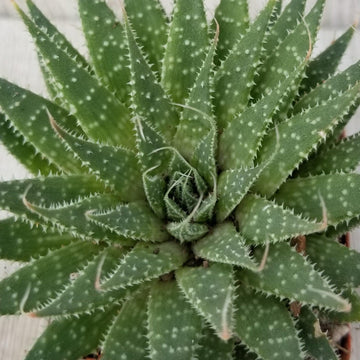
The lace aloe is grown primarily for its attractive succulent rosettes with yellow spots and white bumps on dark green leaves with lacy edges and soft white spines.
Hailing all the way from South Africa, the Aloe aristata can grow up to 8 inches tall and 6 inches wide. From wide bottoms to sharper points at the top, these leaves are pure perfection.
This sun-loving Aloe aristata plant thrives on warmth and dryness; it's like having your very own sunshine-filled oasis indoors or outdoors in xeriscape landscapes. This frost-hardy wonder boasts leaves that mimic the elegance of Haworthia plants and grows at an astonishing pace.
When it comes to flowering, these pollinator-friendly lace aloe plants bloom with tubular orange-red lace aloe flowers during the sizzling summer months, that attract both bees and hummingbirds alike – talk about being irresistible to nature's most delightful creatures!
When and How to Water Your Lace Aloe
The Lace Aloe has moderate watering needs. It is a succulent plant that prefers to be underwatered rather than overwatered. Its large, fleshy succulent stems and lanceolate leaves store water for use during times of drought. It's pretty risky to feed it too much water because it doesn't require it because of this adaptation.
When watering, make sure to thoroughly saturate the soil and then allow it to completely dry before watering again. This Aloe plant is drought-tolerant and can withstand periods of dryness, so it's better to err on the side of underwatering.
In the spring and summer, during the active growing season, you can water the Lace Aloe every two to three weeks. However, in the fall and winter, during the dormant period, watering should be reduced to once a month or even less, as the lace aloe plant requires less moisture during this time. It's always a good idea to check the moisture level of the soil before watering to ensure it is dry.
Light Requirements - Where to Place Your Lace Aloe
When growing indoors, the Aloe Aristata prefers bright, indirect light. It thrives in a location with plenty of natural sunlight, such as a south-facing window. If your home doesn't receive much natural light, you can also use artificial grow lights to provide the necessary light for the plant's growth. Just make sure to position the lights a few feet away from the plant to prevent heat damage.
For outdoor cultivation, the lace aloe can thrive in full sun and partial shade for at least 4-6 hours per day. It's important to protect the aloe aristata from prolonged, direct sunlight, as it can cause the leaves to become scorched. If you notice the leaves turning brown or yellow, it may be a sign that the aloe aristata plant is receiving too much light.
Remember, finding the right balance of light is crucial for the health of the Lace Aloe.
- If the aristata lace aloe isn't receiving enough light, it may become leggy, and its growth may slow down.
- On the other hand, too much light can cause the leaves to become discolored or sunburned.
Observing the Aloe aristata response to its current light conditions and making adjustments as needed will help ensure its well-being.
Optimal Soil & Fertilizer Needs
The Lace Aloe thrives in well-drained soil that mimics its natural habitat. A coarse sand or gritty soil mix is ideal for this succulent plant, as it allows excess water to drain away quickly and prevents the roots from sitting in soggy soil. Instead, simply mix garden soil or buy a well-draining potting mix, or ideally use our specialized succulent potting mix that contains 5 natural substrates and mycorrhizae to promote the development of a strong root system that helps your succulent to thrive.
When it comes to fertilizer, the aristaloe aristata Lace Aloe is not a heavy feeder. It can thrive in nutrient-poor soil, so you don't need to fertilize it frequently. During the growing season, which is typically in spring, you can apply a balanced natural fertilizer once a year.
However, it's important to note that succulents like the Lace Aloe are more prone to damage from overfertilization than underfertilization. Excessive fertilizer can lead to burnt roots and other issues. So, it's best to err on the side of caution and fertilize sparingly. Always observe the plant's response and adjust your fertilization routine accordingly.
Hardiness Zone & More
If you're growing the Lace Aloe indoors, it prefers temperatures between 50-80°F and can tolerate slightly cooler temperatures at night. Avoid placing them near drafts or heating vents, as sudden temperature changes can stress the plant.
You can place it in a well-ventilated area or use a fan to improve air circulation. It is strongly advised that plants be shielded from cold, wet soil conditions in areas that experience a lot of winter and spring moisture (especially rain).
For outdoor cultivation, the Lace Aloe is a cold-hardy plant and can tolerate mild frost in USDA zones 7-12. If you live in a colder climate, you should put them in a pot, and they can then be kept outdoors during the summer and brought in as the temperature drops.
In terms of humidity, the Lace Aloe is adaptable and can tolerate a wide range of humidity levels, but it generally prefers drier conditions. It's important to provide good airflow around the plant to prevent excessive humidity and reduce the risk of fungal diseases.
How to Propagate Your Lace Aloe?
You can easily propagate your lace aloe by removing offsets that grow around the base of the plant. These offsets can be gently separated from the main plant and planted in their own pots with well-draining soil to encourage root growth. Additionally, you can also propagate lace aloe through leaf cuttings by allowing the cut ends to callous over before planting them in soil.
Wildlife - Lace Aloe Attracts the Following Friendly Pollinators
The Lace Aloe attracts pollinators such as bees, hummingbirds, and butterflies with their tubular orange flowers. These succulents are also known for their ability to thrive in low-water conditions, making them a popular choice for drought-tolerant gardens.
Toxicity: The Lace Aloe is completely safe for humans and pets. It is a popular choice for indoor succulent gardens due to its low maintenance requirements and attractive appearance.
Key Takeaways
- The Lace Aloe forms a compact rosette of dark green, fleshy leaves adorned with white, lace-like spots and soft spines along the edges, giving it a unique, ornamental appearance.
- Also known as Spider Aloe, this name reflects its spiky, delicate leaves that resemble spider legs, adding an intriguing visual element to small gardens and indoor spaces.
- When in bloom, Lace Aloe produces tall stalks topped with tubular, orange-red flowers that attract hummingbirds and bees, adding vibrant color to your garden in late summer and fall.
- This aloe is highly drought-tolerant, requiring minimal watering once established, making it an excellent choice for xeriscaping or low-maintenance indoor and outdoor gardens.
The Bottom Line
Overall, the Lace Aloe (Aloe aristata) is a striking, compact succulent known for its unique rosette of dark green leaves adorned with white, lace-like markings and soft spines. Its ability to tolerate cooler temperatures and mild frost makes it more versatile than many other aloe species, especially in outdoor gardens. With its low water requirements, Lace Aloe is a perfect addition to drought-tolerant landscapes or as a low-maintenance indoor plant. During its bloom period, it produces vibrant orange-red flowers that attract pollinators, adding seasonal interest. For best care, place it in well-draining soil with plenty of sunlight, water sparingly, and protect it from extreme cold.
Shipping Notes
- Free Standard Shipping on $100+ Orders to the USA.
- Except Preorder products are shipped in 48 hours.
- Delivery to the USA:
- Standard Shipping : 3-10 business days
- If time is of the essence, please consider selecting expedited delivery for faster service.
Exchange/Return Notes
- We offer a 30-day return/exchange service after receiving.
- Final sale items are not eligible for returns or exchanges.
- To process your return/exchange, please contact us at [email protected]
- Please click here for more details>>> Return & Exchange Policy