Shipping Estimate
USA
- USA
- CAN
- USA
- CAN
Ships within 48 hours · Estimated delivery Jul 12 - Jul 17
 Promo Codes Available:
For Your Every Summer RSVP, with Code: SUMMER15
Description
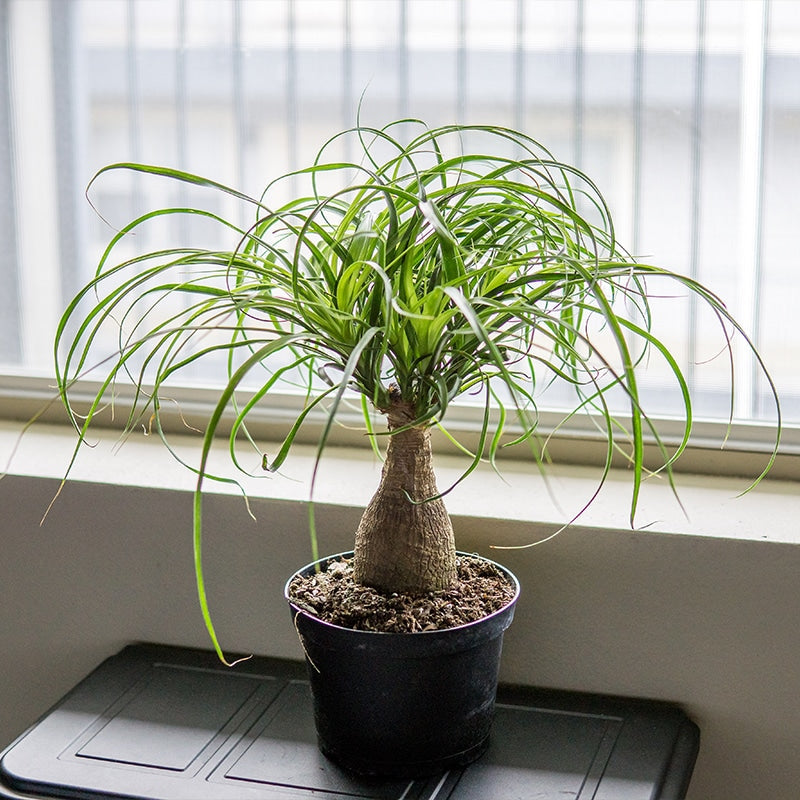
plant pot for palm Ponytail Palm Tree - 6 Inch PotThe Ponytail Palm Is A Living Sculpture That Thrives on Neglect The Ponytail Palm Brings Striking Texture, Effortless Care, and Decades of Character to Any Space Cascading, bright green foliage fans out from a swollen, sculptural trunk base for a truly one of a kind look. Stores water in its trunk making it remarkably drought tolerant and forgiving of irregular watering schedules. Slow growing and long lived; a single plant can be a companion for 50
The Ponytail Palm Is A Living Sculpture That Thrives on Neglect
The Ponytail Palm Brings Striking Texture, Effortless Care, and Decades of Character to Any Space
- Cascading, bright green foliage fans out from a swollen, sculptural trunk base for a truly one-of-a-kind look.
- Stores water in its trunk making it remarkably drought-tolerant and forgiving of irregular watering schedules.
- Slow-growing and long-lived; a single plant can be a companion for 50 years or more!
- Thrives indoors in bright light or outdoors in USDA Zones 9–11; ideal for patios, offices, and sunny rooms
- Low-maintenance and beginner-friendly, perhaps one of the most resilient ornamental plants you can own
If you've been searching for a plant that makes a statement without making demands, the Ponytail Palm (Beaucarnea recurvata) is exactly what you're looking for. Despite the name, this isn't a true palm at all, it's a succulent, native to the dry regions of eastern Mexico, and it's built accordingly. That distinctive swollen base, called a caudex, isn't just for show. It stores water, allowing the plant to sail through stretches of neglect that would finish off most houseplants. Pair that with a dramatic cascade of long, slightly curly leaves arching outward like a fountain, and you have something genuinely hard to replicate in the plant world.
What Makes the Ponytail Palm Right for You?
Sculpture and Plant in One: Few houseplants develop the kind of visual presence a mature Ponytail Palm carries. The bulbous, textured trunk base — sometimes called Elephant's Foot — grows more impressive and characterful with age, while the long, flowing foliage creates a soft, layered effect above it. It fits naturally into modern, minimalist, and desert-inspired interiors, and it holds its own as a statement piece on a sunny patio or in a bright entryway.
Built to Survive: The water-storing caudex gives the Ponytail Palm a drought tolerance that's genuinely hard to match. Between waterings, when the soil dries out completely, the plant simply draws on its reserves. This makes it an ideal plant for frequent travelers, busy households, or anyone who has struggled to keep more demanding plants alive. Occasional neglect isn't a problem here — it's practically part of the care routine.
A Plant You'll Have for a Lifetime: The Ponytail Palm grows slowly and lives long. Indoors, it typically stays under six feet, making it manageable for most spaces indefinitely. With proper care, these plants live for decades — some well past the 50-year mark. This is a plant you buy once and pass down.
Pups for Propagation: Mature plants occasionally produce small offsets at the base, called pups. These can be separated and grown into new plants, making it easy to expand your collection or share with other growers over time.
How to Care for a Ponytail Palm
Outdoor growers in Zones 9–11 can plant directly in the ground in a sunny, well-drained spot. Frost protection is important in cooler zones, and container growing makes it easy to bring the plant in when temperatures drop.
- Place in bright, indirect light for best growth; it can handle full sun and adapts well to indoor conditions with good natural light.
- Use our Succulent & Cactus Soil for the perfect well draining blend.
- Water infrequently and allow the soil to dry out between waterings; overwatering is the most common way to lose this plant.
- Fertilize once or twice during the growing season with our Root Boosting Slow Release Fertilizer.
- Rotate the container occasionally so growth stays even toward the light source.Trim any brown leaf tips with clean scissors to keep the foliage looking tidy.
Why Buy from Perfect Plants Nursery?
We grow what we sell. Every Ponytail Palm that ships from us has been cared for right here at our Florida nursery and goes straight to your door. We've been a family owned business selling plants since 1980, and plants like this one, with real character and real longevity, are exactly what we love growing.
Shop the Ponytail Palm for sale or browse our complete collection of houseplants for sale.
Shipping Notes
- Free Standard Shipping on $100+ Orders to the USA.
- Except Preorder products are shipped in 48 hours.
- Delivery to the USA:
- Standard Shipping : 3-10 business days
- If time is of the essence, please consider selecting expedited delivery for faster service.
Exchange/Return Notes
- We offer a 30-day return/exchange service after receiving.
- Final sale items are not eligible for returns or exchanges.
- To process your return/exchange, please contact us at [email protected]
- Please click here for more details>>> Return & Exchange Policy