SKU: 58709893856
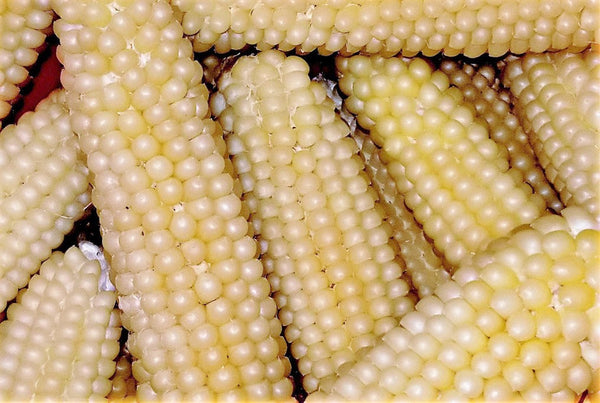
white popcorn seeds for planting

white popcorn seeds for planting Japanese White Hulless Popcorn Ornamental Corn

Sale price$20.30 Regular price$22.56
Save 10%

Shipping Estimate
USA
  • USA
  • CAN

Ships within 48 hours · Estimated delivery Jul 13 - Jul 18

Promo Codes Available:

For Your Every Summer RSVP, with Code: SUMMER15

Description

white popcorn seeds for planting Japanese White Hulless Popcorn Ornamental CornJapanese Hulless Popcorn produces white popping kernels on dwarf 4 inch cobs grown on 4 5 foot tall stalks! This old favorite produces popcorn kernels that are delicious, unusually tender, sweet, and all white when popped! Its fast growth and adaptability make Japanese Hulless Popcorn an easy and rewarding crop for gardeners, thriving in full sun and well drained soil. The stalks grow to a manageable height, making them suitable for smaller gardens or

Japanese Hulless Popcorn produces white popping kernels on dwarf 4-inch cobs grown on 4-5 foot tall stalks! This old favorite produces popcorn kernels that are delicious, unusually tender, sweet, and all-white when popped! Its fast growth and adaptability make Japanese Hulless Popcorn an easy and rewarding crop for gardeners, thriving in full sun and well-drained soil. The stalks grow to a manageable height, making them suitable for smaller gardens or container planting, while still producing abundant ears. Not only is it a healthier snack option, packed with fiber and low in calories, but the satisfaction of growing and popping your own popcorn at home adds a fun, wholesome activity for the entire family. This variety also boasts excellent storage capabilities, allowing you to save the dried kernels for popping well after the harvest season.

Corn is one of the plants grown in the traditional Native American vegetable technique called the Three Sisters. The other two plants in the Three Sisters are beans and squash, and each has its role in the companion planting tradition. Corn serves as a support for the vining beans. Squash served as a ground cover, preventing weeds from growing. Beans provided natural fertilizer for all.

Also Known As: Tom Thumb, Australian Hulless, Dwarf Baby Rice, Popping Corn, Native American Corn, Flint Corn, Indian Corn, Pole Corn, Maize, Maise, Calico Corn, Baby Popcorn, Ornamental Corn, Decorative Corn.

Plant Name: Ornamental Corn, Japanese Hulless Popcorn
Latin Name: Zea mays
Days to Germinate: 10-14
Days to Harvest: 80-110
Plant Height: 6 - 8 Feet
Spread: 2 - 3 Feet
Growth Habit: Upright
USDA Zones: 2-11
Lifespan: Annual
Brand: TomorrowSeeds
Sunlight: Full Sun, Partial Shade
Pollination: Heirloom, Open-Pollinated
GMO: No
Fungicide-Treated Seeds*: No
Seeds Packed For**: 2026
*Fungicide-treated seeds protect the seedlings from diseases until they are up and growing. Do not eat treated seeds.
**Seeds are freshly packed for the growing season of the year listed. Seeds are still viable beyond pack date. Store in a cool and dry location such as the refrigerator or basement to best preserve germination rates.


Planting Instructions:

Soil Preparation:

Choose an area with heavy, well-draining soil that receives at least 6 hours of sunlight each day. Remove weeds, large rocks, and litter from the planting area. Leave small weeds and dead grass, they will enrich the soil when turned under. Spade or till the soil 8-12 inches deep. Loosening the soil will help the plant establish strong roots.

Corn grow best in soil with lots of organic matter. You may optionally add fertilizer or organic material such as compost, leaves, or rotted hay to mix into the soil at this point. For small gardens, scatter 2-3 tablespoons of fertilizer evenly and work into the top 2-3 inches of soil for each hill or 2 foot by 2 foot planting area. For larger gardens, scatter 2-3 pounds of a complete fertilizer for each 100 square feet of planting area. Work fertilizer or organic material into the soil and leave the surface smooth.

Form rows of soil beds 4-6 inches high and at least 15 inches apart. This formation of ridges will help with drainage.

For small gardens, corn is best planted in square blocks instead of long rows to improve cross-pollination between corn stalks.

Planting:

Ornamental Corn are best direct-sown because they often don’t transplant well. Plant corn outdoors in spring when soil temperatures warm to at least 65F. To plant, make holes 2 inches deep and spaced 8 inches apart down the rows of raised beds. Plant 1 seed per hole. Plant 2-3 seeds if choosing to thin to the strongest plant. When thinning, determine the strongest and healthiest plant, then remove all other plants, narrowing to a single plant per hole. Cover seeds thinly with soil and water after planting.


Planting Depth: 2 inch
Within-Row Spacing: 8 inches
Between-Row Spacing: 15 inches


Care During the Season:

Watering: Keep corn plants watered, soaking the soil to a depth of 6-8 inches, once a week. If there is no rainfall, water 2 times a week. Sandy soils may need to be watered more often than heavy clay soils.

A good rule of thumb is to water when the top inch of soil feels dry. Weeding: Keeping plants weed-free improves production. If plowing or hoeing, do not dig deeper than 1 inch to prevent from cutting the feeder roots.

Fertilizing: Once corn plants reach 4-6 inches tall, you may optionally apply a nitrogen-rich fertilizer, without letting the fertilizer touch the plants. A second round of nitrogen-rich fertilizer can be applied to plants when they reach 12-18 inches tall. Then a final round of nitrogen-rich fertilizer can be applied during the tasseling stage, just before ears silks emerge. Read and follow fertilizer instructions for best application. Water plants after fertilizing.

Insecticides: Insecticides may be used to protect plants. Bt-based insecticides and sulfur are organic options that can be used for prevention. Sulfur also has fungicidal properties and helps in controlling many diseases. Before using a pesticide, read the label and follow cautions, warnings and directions.

Diseases: If spots or mold appear, treat plants with an approved fungicide. Neem oil, sulfur, and other fungicides may be used. When using fungicides always follow label directions.

Harvesting:

Harvest ornamental corn when the kernels are fully mature, around 100 to 120 days after planting. The husks should be dry and the kernels should feel firm when pressed. Harvest ornamental corn after the first frost, as the cool temperatures help intensify the colors of the kernels. To harvest, use pruners or a sharp knife to cut the ears from the stalk, leaving a few inches of the cob intact. After harvesting, you can hang the corn in a cool, dry place to finish drying for a couple of weeks if needed, ensuring the kernels are fully set for storage or decorative use. You may optionally coat Indian corn with lacquer to give a shiny appearance to use for decoration. If harvesting for popcorn, strip corn and save kernels for popping.

Shipping Notes
  • Free Standard Shipping on $100+ Orders to the USA.
  • Except Preorder products are shipped in 48 hours.
  • Delivery to the USA:
  1. Standard Shipping : 3-10 business days
  • If time is of the essence, please consider selecting expedited delivery for faster service.
Exchange/Return Notes
  • We offer a 30-day return/exchange service after receiving.
  • Final sale items are not eligible for returns or exchanges.
  • To process your return/exchange, please contact us at [email protected]
  • Please click here for more details>>> Return & Exchange Policy
SKU: 58709893856

Discover Niche Categories That Outsell white popcorn seeds for planting

Top-Converting Item to Boost Your Average Order

4.2 ★★★★★
Based on 865 reviews
Sort
Highest Rating
Newest First
Oldest First
Product Reviews
C
Verified Purchase
Charlie Burnham
Birmingham, US
★★★★★ 4
Expensive, but it works
The good parts: Yup, this works with DP alt mode, single cable use works for most devices I tried (steam deck, laptop, odin mini 2) even without the hub powered through the power in on the hub, I even got it working without external power to either the hub or my small usb-c monitor. However, some devices like my phone likely didn't give enough power for it to work without another power source. On my phone it worked for some usb devices without external power, but the dp alt mode didn't do work. DP alt on my phone works just fine with external power connected to the hub. Powering it with a small but powerful power bank worked fine, but lower power power banks might not keep up especially if the monitor isn't getting it's own power. It only takes a watt or two of power for the hub itself from some quick and dirty measurements charging my laptop through the pd-in on the hub. As for the rest of it, the three usb 3 ports means you should be enough to get by for any use case, though you may need more dongles or adapters to get the type of connections you need, but quite usable as-is for a lot of purposes. Basically it does what it says, there really is no other hub currently that can do pd alt mode, only big docks which need power supplies. The ok parts: *When it isn't powered* I noticed that with a monitor already plugged in, plugging it into a device would lead to the monitor not being initialized. But plugging the hub into the device first before connecting the monitor worked. No issue when it was powered. You can use this to get display out and charge with a Nintendo switch, but if it's not powered through the pd-in it probably wont switch to TV mode and output video, not sure if that's because of power or software reasons. This is a nitpick, but if you care about the feel or aesthetic it's noticeably bland. The case is plastic and there seems to be no weighting on the inside, it's very light, which can feel cheap but it's not like adding weights would functionally make it better, the case also has a bit of a harsh feeling where it's joined, but it does feel solid and durable enough. It's clearly function over form, just barely meets the minimum bar imo. The bad part: You already saw, but the price is a bit steep for a hub (at $80). I'd love to see it at 60 or even 40 instead, I hope more similar hubs pop up for competition. In summary: It does what it says, if you know you want this and what it is then get it, I feel like it shouldn't cost this much, but it's quite usable and for now it's the only option for a DP alt mode hub. Minus a half star each for subpar presentation and price 4/5
WAS THIS REVIEW HELPFUL?YesReportShare
Reviewed in the United States on October 4, 2024
J
Verified Purchase
Jeffery Delia
Houston, US
★★★★★ 5
Great for AR Glasses
This USB hub has been great for me! It's taken me so long to finally find a stable setup to allow using my XREAL Air glasses, peripherals, and charger at the same time. I've used this both with my phone and ROG Ally and I have not once had a problem. I even found that my ROG Ally manages to get the full supported PD of 65W, as long as I power the hub with a 100W PD charger. That said though, using a 65W PD charger is still more than adequate to charge the device while using various peripherals and a USB-C display. Previously I used USB-C hubs with HDMI out and another device to merge the HDMI output with a USB-A connection into a single USB-C cable that I use for my AR glasses. This setup worked, but would increasingly stutter/freeze the longer I used it forcing me to constantly unplug and re-plug it in. In trying to find a solution that didn't split and merge back the display signal with USB data/power, this hub was the only one I found that wasn't thunderbolt 3/4. I will say that I wish the cable to the host device was either longer and less rigid, or shorter with an optional extension cable. An ethernet port would have also been nice, but using up one of the USB-A ports with a USB ethernet adapter works if needed. Plus, if I wanted ethernet with it, then a dock would probably have been a better option over a hub anyway.
WAS THIS REVIEW HELPFUL?YesReportShare
Reviewed in the United States on December 29, 2023
B
Verified Purchase
Brandon Dean
West Palm Beach, US
★★★★★ 5
One of the only dongles that supports a usb-c display (alt mode) AND Power Delivery!
If you are like me and have laptop that only has a couple of usb-C ports (one of which has to be used for charging), but want to free up a port, this is the ONLY dongle I have found that does the job flawlessly AND affordably. The dongle has a usb C port. for power delivery as well as a second usb C that not only supports data, but has the necessary specs to support a usb C monitor (via DP alt mode). This is only dongle I have come across that has the necessary hardware to support a usb C monitor for less than 100 bucks.
WAS THIS REVIEW HELPFUL?YesReportShare
Reviewed in the United States on May 13, 2024
R
Verified Purchase
Rob. Hum.
Draper, US
★★★★★ 5
(Steam Deck Verified) Works like a charm on Dual QHD 2560x1440 (1440p)
This could be one of those reviews where I tell you how well this works for work Zoom Meetings and the Monthly TPS Excel reports. But my primary concern was the Steam Deck my secondary concern was being able to see more work. Luckily it worked for both. The Steam Deck is capable of pushing to both 1440p monitors without any issues. I don’t have many AAA games, but if it helps: Hogwarts Legacy ran at full speed on auto detect (medium) graphics. No ghosting, no tearing, no lag. I tried No Man Sky for something with very high particle and blooming. Still ran like a champ. Mafia Definitive Edition runs like Estes Kefauver at a meeting of Murder Incorporated. If it runs on the Steam Deck this hub can push it… Remember my monitors are only QHD 1440p. One laptop worked amazingly. 1440p Zoom Calls, Excel Spreadsheets as far as the eyes could see. BOTH EMAIL AND CHAT OPEN ON THE SAME SCREEN! *Car salesman roof slap* This baby has so many pixels. The other laptop didn’t support video over USB-C nor Power Delivery. The USB hub worked very well as a USB hub though. The USB ports are all fast and reliable. My USB 3.x devices have varying speeds. I don’t think any device measured the full through put, but given the equipment I have to work with (it could be the equipments fault) I am happy with a 4.8 out of 5. Using the power delivery port on this hub will allow you to charge attached devices. Steam Deck charges, Laptops with USB-C Power Delivery charge. Laptops without power delivery will not charge. The ports with pictures of keyboards, please plug your USB Keyboard and Mouse in these ports. These ports are USB 2.0. They will run slow if any other devices are plugged into them. If your device does not support Thunderbolt, Alt HDMI, or Displayport over USB-C, You will not be able to use the video ports.
WAS THIS REVIEW HELPFUL?YesReportShare
Reviewed in the United States on February 23, 2023
A
Verified Purchase
Amazon Customer
Bozeman, US
★★★★★ 5
Great product, had an issue, they took care of it.
Purchased this to allow me to run one cable to a laptop and have monitor/power/external accessories all connect easily. After a few days I noticed my monitor would disconnect and I would need to unplug and replug the device. Reached out to Anker support and they responded quickly to help diagnose and then sent a replacement unit very quickly. Was seriously impressed with the support and follow up. Item has been working perfectly since - makes a great clean setup.
WAS THIS REVIEW HELPFUL?YesReportShare
Reviewed in the United States on September 8, 2023

recommand products