SKU: 5141230161
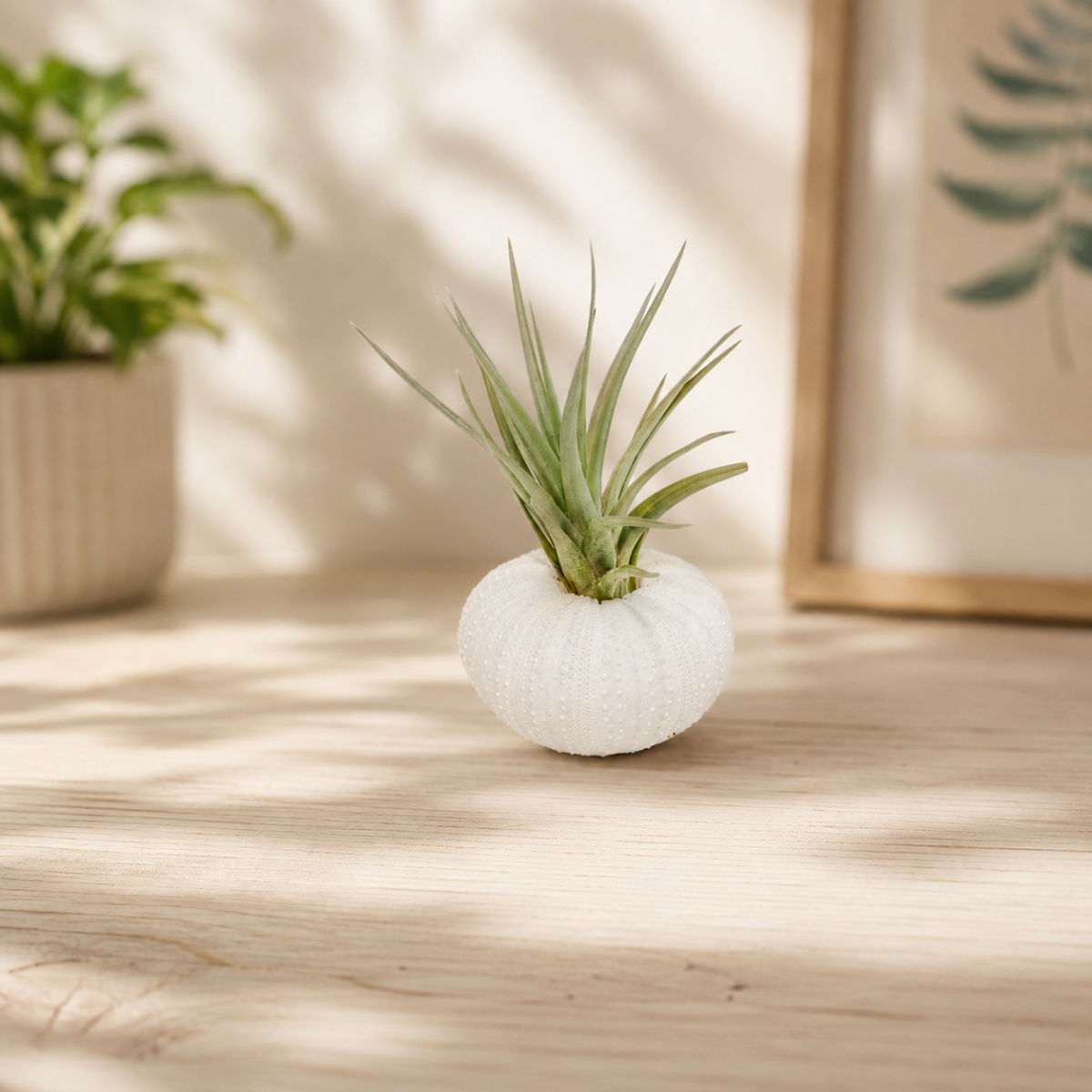
air plant with holder

air plant with holder White Urchin with Tillandsia Air Plant, No Soil Needed, Easy Care by Succulents Box

Sale price$22.82 Regular price$25.36
Save 10%

Shipping Estimate
USA
  • USA
  • CAN

Ships within 48 hours · Estimated delivery Jul 14 - Jul 19

Promo Codes Available:

For Your Every Summer RSVP, with Code: SUMMER15

Description

air plant with holder White Urchin with Tillandsia Air Plant, No Soil Needed, Easy Care by Succulents BoxDescription Light Soil Water Hardiness The White Urchin with Tillandsia Air Plant is a creative pairing of a natural sea urchin shell and a living Tillandsia, a genus of epiphytic plants in the bromeliad family native to Central and South America and the southern United States. Tillandsias are commonly called air plants because they require no soil to grow, drawing moisture and nutrients directly from the air around them. This combination turns an

  • The White Urchin with Tillandsia Air Plant is a creative pairing of a natural sea urchin shell and a living Tillandsia, a genus of epiphytic plants in the bromeliad family native to Central and South America and the southern United States. Tillandsias are commonly called air plants because they require no soil to grow, drawing moisture and nutrients directly from the air around them. This combination turns an organic coastal keepsake into a miniature living display.

    The white sea urchin shell serves as a natural vessel, its rounded, textured form contrasting beautifully with the soft, arching green to silvery-green leaves of the Tillandsia nestled inside. The spiky, rosette-shaped air plant typically stays compact, reaching just a few inches in width, making it ideal for small shelves, windowsills, terrariums, or as a standalone accent piece on a desk or tabletop.

    This arrangement makes a charming gift and fits effortlessly into coastal, bohemian, or minimalist home decor. Because it needs no soil or pot, it is wonderfully versatile and easy to move around the home. This plant is best placed away from curious cats and dogs, and kept out of reach of young children to protect the delicate shell and plant.
  • Tillandsia air plants thrive in bright, indirect light. Place yours near a sunny window where it receives several hours of filtered light each day. Avoid prolonged direct afternoon sun, which can scorch the delicate leaves. Fluorescent or full-spectrum grow lights also work well if natural light is limited in your space.

    Water by misting the leaves thoroughly two to three times per week, or by gently removing the plant from the shell and soaking it in room-temperature water for 20 to 30 minutes once a week. After soaking, shake off any excess water and allow the plant to dry completely within four hours before returning it to the shell. Standing water trapped in the base of the leaves can cause rot, so good airflow after watering is essential.

    No soil is needed for Tillandsia air plants. They absorb water and nutrients through tiny structures on their leaves called trichomes. The sea urchin shell simply acts as a decorative holder. If you ever want to display the plant differently, it can rest on any clean, dry surface or be placed in a terrarium, on driftwood, or mounted with safe adhesive.

    Tillandsias prefer temperatures between 50 and 90 degrees Fahrenheit (10 to 32 degrees Celsius). They appreciate good air circulation, so avoid placing them in sealed containers or stuffy corners. Keep them away from heating or air conditioning vents, which create dry, harsh airflow that can stress the plant. Normal household humidity levels are generally sufficient, though occasional misting helps in drier climates.

    Feed your Tillandsia once a month using a bromeliad or air plant fertilizer diluted to one quarter of the recommended strength. Apply it by misting the leaves directly with the diluted solution. Fertilizing is optional but encourages healthier growth and can prompt the plant to produce its colorful bloom when it reaches maturity.
  • USDA Hardiness Zones 9-11 | Minimum temperature: 25°F (-4°C)

    In zones 9 through 11, Tillandsia air plants can be displayed outdoors in a sheltered spot with bright, filtered light and good airflow during warm months. Bring them indoors when temperatures drop below 50 degrees Fahrenheit (10 degrees Celsius), as they are sensitive to cold and cannot tolerate frost. In cooler zones, they are best grown year-round as indoor plants near a bright window.

Shipping Notes
  • Free Standard Shipping on $100+ Orders to the USA.
  • Except Preorder products are shipped in 48 hours.
  • Delivery to the USA:
  1. Standard Shipping : 3-10 business days
  • If time is of the essence, please consider selecting expedited delivery for faster service.
Exchange/Return Notes
  • We offer a 30-day return/exchange service after receiving.
  • Final sale items are not eligible for returns or exchanges.
  • To process your return/exchange, please contact us at [email protected]
  • Please click here for more details>>> Return & Exchange Policy
SKU: 5141230161

Discover Niche Categories That Outsell air plant with holder

Top-Converting Item to Boost Your Average Order

4.8 ★★★★★
Based on 2003 reviews
Sort
Highest Rating
Newest First
Oldest First
Product Reviews
M
Verified Purchase
Michael R
Lexington, US
★★★★★ 5
Comfortable fit for arthritis hands and on the fly functions.
Color: Grey
I bought my wife this mouse in 2022 and she has had no issues with it. I had a different wireless mouse that I used that started causing issues in my everyday working and the speed and clicks of the mouse were causing issues. I decided to steal her mouse for a while and found, wow, this is great. I bought myself on and totally love the response I get. The DPI change on the fly is the game changer for me. You can instantly click to change the speed of the curser and make your clicks more accurate. This will be my mouse for choice. I have arthritis in my knuckles but, this mouse does not bother my hand at all. totally comfortable for a 12 hour workday.
WAS THIS REVIEW HELPFUL?YesReportShare
Reviewed in the United States on April 30, 2026
A
Verified Purchase
Amazon Customer
Birmingham, US
★★★★★ 5
Wireless mouse
Color: Red
Nice item. Quiet click.
WAS THIS REVIEW HELPFUL?YesReportShare
Reviewed in the United States on June 10, 2026
W
Verified Purchase
willie b
Pawtucket, US
★★★★★ 5
Works good,good value
Color: Grey
Works good
WAS THIS REVIEW HELPFUL?YesReportShare
Reviewed in the United States on May 30, 2026
M
Verified Purchase
MJW
Lexington, US
★★★★★ 4
6 switches not for left handers
Color: Grey
It's everything as advertised... However if you are left handed the thumb switches are pressed inadvertenly by how you hold the mouse... and you find it skipping to another page...
WAS THIS REVIEW HELPFUL?YesReportShare
Reviewed in the United States on June 8, 2026
R
Verified Purchase
RocketMan1969
West Palm Beach, US
★★★★★ 5
A Truly Ergonomic Mouse
Number of Items: 1
Other not completely flat mice claim to be "ergonomic", but the only way to completely remove stress from your forearm when using a mouse is with a "vertical" mouse. My 2020 K75575WW Kensington ergonomic vertical mouse developed a problem with the left button "stuttering" so that it sent multiple button clicks when pressed just once. I liked the Kensington quite a bit. But it always just a little bit on the "not quite as solid as I would like" side, and failing after just 2.5 years confirmed this. So I wanted a more solidly build mouse. A search for "ergonomic mouse review" showed that the Logitech MX Master 3S was clearly the best ergonomic mouse available. At $100 it was several times more expensive as others including the latest Kensington vertical mouse. But sometimes furgal doesn't mean the least expensive. Sometimes it can mean the most expensive if that comes with better performance, features and lifespan. So I ordered it. And while it is indeed an incredible mouse, the angle is only about 20 degrees. The result is that while there is some reduction in forearm stress compared to a flat mouse, it wasn't enough for me. By the end of my very long days driving my mouse almost as much as I drive my keyboard, I could feel the tension building up in my forearm. So after a week I returned it and bought this Logitech MX Vertical. It is slightly less expensive than the MX Master 3S, but still much more expensive relative to other options. And while it is lighter and a little less substantial feeling in my hand than the MX Master 3S, it still feels very firm and solid. Most importantly keeps my hand in the neutral position with my fingers at about 70 degrees. A great feature of the MX Vertical shares with the MX Master 3S is the thumb rest. The Kensington didn't have this and so my thumb rested on the desktop. If it was a bit warm and my hands would sweat my thumb wouldn't slide smoothly and I would have to lift my thumb off the desk when I went to move the mouse. Not a horrible thing, but if you spend 8+ hours mousing around it gets tiresome. The button clicks are crisp. Best of all when the button bottoms out it feels like it is pressing against the case. It doesn't feel like travel is being limited by the switch itself bottoming out like the Kensington felt like it did. My hope is that this will keep the switch from wearing out so fast as happened with the Kensington. One slight negative of the MX Vertical is that I don't feel like I am quite as accurate in being able to move the cursor to a specific spot on the screen without some amount of conscious effort. Instead it doesn't go exactly in the direction I intended and overshoots where wanted it to stop. As such it might not make the best mouse for video games. [UPDATE: There is a bit of a learning curve in moving the mouse accurately. In the last couple weeks my need to make a more conscious effort to move the mouse to a specific spot on the screen is going down. Still think it is likely to not be as accurate as a flater mouse]
WAS THIS REVIEW HELPFUL?YesReportShare
Reviewed in the United States on February 13, 2023

recommand products