Shipping Estimate
USA
- USA
- CAN
- USA
- CAN
Ships within 48 hours · Estimated delivery Jul 14 - Jul 19
 Promo Codes Available:
For Your Every Summer RSVP, with Code: SUMMER15
Description
aloe vera plant pots 30Aloe vera is one of the most iconic and ancient succulents in cultivation, celebrated for both its striking architectural form and renowned healing properties. Belonging to the Asphodelaceae family and native to the arid regions of the Arabian Peninsula, this resilient plant has been cherished for centuries across cultures as a natural remedy, a symbol of health, and a timeless ornamental species. The plant forms a rosette of thick, fleshy, lance
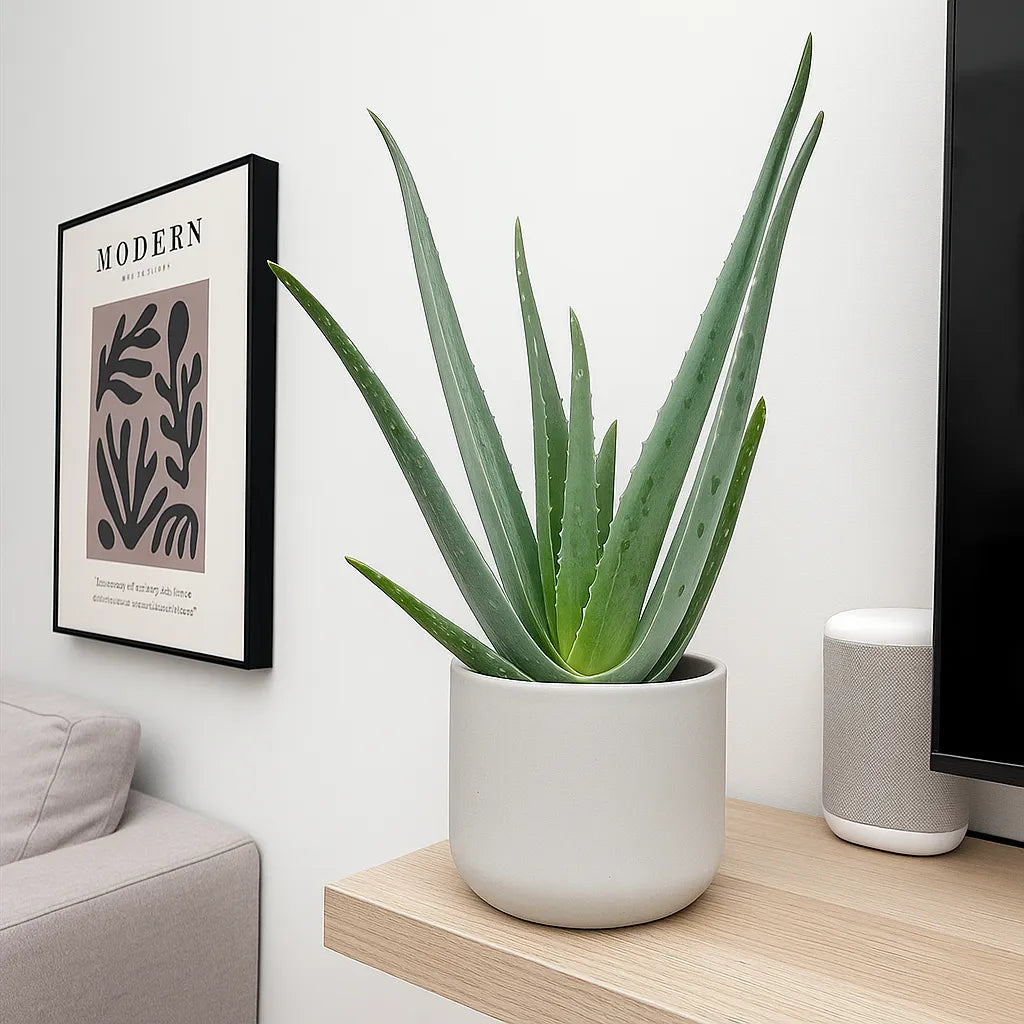
Aloe vera is one of the most iconic and ancient succulents in cultivation, celebrated for both its striking architectural form and renowned healing properties. Belonging to the Asphodelaceae family and native to the arid regions of the Arabian Peninsula, this resilient plant has been cherished for centuries across cultures — as a natural remedy, a symbol of health, and a timeless ornamental species.
The plant forms a rosette of thick, fleshy, lance-shaped leaves in shades of green to blue-green, often speckled when young. The leaf edges are lined with soft, white serrations, giving the plant a sculptural, modern aesthetic. Inside each leaf is a clear, cooling gel packed with vitamins, minerals, and amino acids — long used in skincare and traditional medicine to soothe burns, moisturise skin, and promote healing.
When grown in ideal conditions, mature plants may produce tall, slender flower spikes bearing tubular yellow to orange blooms, adding a delicate vertical accent to their bold form.
Aloe vera – Care Guide
Light
Thrives in bright, indirect light to full sun. Indoors, position near a south- or west-facing window for maximum brightness. Outdoors, it enjoys full sun but benefits from light shade during the hottest part of the day. Insufficient light may cause leggy growth and pale leaves.
Watering
Water deeply but infrequently. Allow the soil to dry out completely between waterings. Overwatering is the most common cause of issues — Aloe vera stores water in its leaves and can tolerate drought far better than excess moisture. In winter, reduce watering to once every 3–4 weeks. Always ensure excellent drainage.
Temperature and Humidity
-
Temperature: Prefers 18–30°C. Can tolerate short dips to 10°C, but prolonged cold will damage the leaves.
-
Humidity: Adapts well to normal indoor humidity (30–50%). It prefers drier air and is well-suited to centrally heated homes.
Soil and Potting
Use a free-draining succulent or cactus mix, or combine compost with perlite and coarse sand. The roots must never sit in water. Terracotta pots are ideal for their breathability and moisture regulation. Repot every 2–3 years or when the plant becomes root-bound, ideally in spring.
Feeding
Feed sparingly — every 6–8 weeks during spring and summer with a diluted cactus or succulent fertiliser. Overfeeding can cause weak, watery growth. No feeding is necessary during autumn or winter.
Pruning and Maintenance
Remove any dried or damaged lower leaves by cutting them cleanly at the base. Wipe leaves occasionally to remove dust and maintain their healthy sheen. Older plants may produce offsets (“pups”), which can be separated and replanted once they develop roots.
Growth and Maturity
A slow to moderate grower, typically reaching 40–60 cm in height and spread indoors. Given enough space and light, it forms a graceful rosette that continues to expand with age. Mature plants may bloom annually under bright, warm conditions.
Common Issues
-
Yellowing or mushy leaves: Overwatering or poor drainage.
-
Brown tips: Underwatering or fluoride in tap water.
-
Pale leaves: Insufficient light.
-
Pests: Occasionally attracts mealybugs or scale; remove with a cotton swab dipped in rubbing alcohol.
Background and Benefits
Labeled “the plant of immortality” by the ancient Egyptians, Aloe vera has been used for over 6,000 years as a natural remedy for burns, skin conditions, and digestive health. Its inner gel contains vitamins A, C, E, and B12, antioxidants, and enzymes that promote healing and hydration.
Beyond its medicinal heritage, Aloe vera is one of the best air-purifying succulents, known to absorb formaldehyde and benzene from indoor air. It’s also incredibly low-maintenance, making it a perfect choice for both beginners and experienced collectors who appreciate functional beauty.
✅ Quick Care Summary
Light: Bright light to full sun
Water: Allow soil to dry completely between watering
Temperature: 18–30°C; avoid below 10°C
Humidity: Low to average (30–50%)
Soil: Free-draining cactus/succulent mix – compost, sand, perlite
Feed: Every 6–8 weeks in spring/summer
Growth: Compact rosette, 40–60 cm; thick fleshy leaves with serrated edges
⚠️ Toxicity Note: While Aloe vera gel is safe for topical use, the latex layer beneath the leaf skin can be toxic if ingested, especially for pets. Keep out of reach of animals and children.
🌿 Styling Tip:
Display Aloe vera in a terracotta or stone planter to complement its desert aesthetic. It pairs beautifully with other drought-tolerant plants such as Sansevieria boncel ‘Variegata’ or Euphorbia trigona ‘Rubra’ for a sculptural, sun-loving arrangement that brings texture and tranquillity to bright indoor spaces.
Shipping Notes
- Free Standard Shipping on $100+ Orders to the USA.
- Except Preorder products are shipped in 48 hours.
- Delivery to the USA:
- Standard Shipping : 3-10 business days
- If time is of the essence, please consider selecting expedited delivery for faster service.
Exchange/Return Notes
- We offer a 30-day return/exchange service after receiving.
- Final sale items are not eligible for returns or exchanges.
- To process your return/exchange, please contact us at [email protected]
- Please click here for more details>>> Return & Exchange Policy