Shipping Estimate
USA
- USA
- CAN
- USA
- CAN
Ships within 48 hours · Estimated delivery Jul 11 - Jul 16
 Promo Codes Available:
For Your Every Summer RSVP, with Code: SUMMER15
Description
rooting pencil cactus cuttings Buy 'Pencil Cactus - Euphorbia tirucalli Firesticks' Care and Growing GuideIntroducing the Pencil Cactus, botanically known as Euphorbia tirucalli Fire Sticks (also called Sticks on Fire), a striking succulent prized for its sea coral like appearance and vibrant, loosely branching pencil thin stems that develop brilliant shades of green, orange, and red. Native to Southern Africa, this unique succulent belongs to the Euphorbiaceae (spurge) family, not the cactus family (Cactaceae), though it is commonly referred to as Pencil
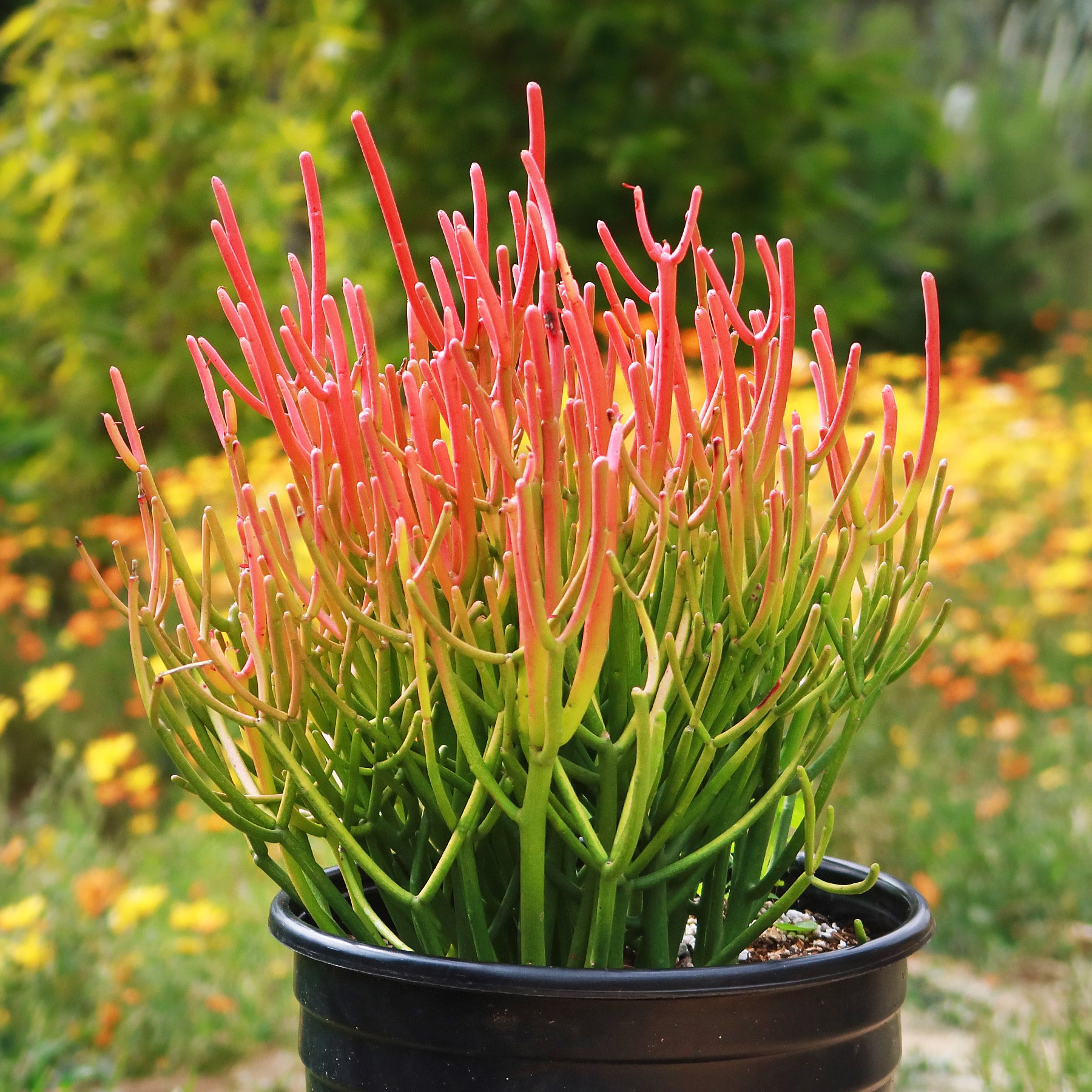
Introducing the Pencil Cactus, botanically known as Euphorbia tirucalli ‘Fire Sticks’ (also called Sticks on Fire), a striking succulent prized for its sea coral-like appearance and vibrant, loosely branching pencil-thin stems that develop brilliant shades of green, orange, and red.
Native to Southern Africa, this unique succulent belongs to the Euphorbiaceae (spurge) family, not the cactus family (Cactaceae), though it is commonly referred to as “Pencil Cactus” because of its cactus-like form and upright growth habit. It is also known by several other common names, including fire sticks plant, sticks on fire succulent, fire plant, red pencil tree, milk bush, and Euphorbia tirucalli ‘Rosea’.
When exposed to direct sunlight, the tips turn red, which is why they are also called firesticks.
This fast growing evergreen succulent can grow up to 30 feet tall and 10 feet wide, forming a thicket of brilliantly colored vertical stems with loose branches.
The unusual stems of this firestick plant, which are as thin as pencils, have a reddish-golden hue that becomes yellow in the summer and red again in the winter.
The pencil cactus flowers boast vibrant yellow, pink, or orange blooms in the summer and spring, making them a true showstopper in any garden.
The pencil cactus is extremely drought tolerant and hard to kill, and as a result, is a great, low-maintenance, easy-care plant for your home or garden.
You can grow your pencil cactus indoors year-round as a houseplant. If planting outdoors, it's best to do so in the spring when temperatures are warm and stable. This cactus grows faster than many other cacti, making it a striking addition to your garden or home.
If you cut your pencil cactus, be careful—the thick, white sap is toxic and can cause skin irritation, burns, or severe eye irritation if it gets into your eyes. While highly irritating, some cultures have historically used it in traditional medicine for treating growths like warts and tumors, though it is not safe for home remedies. Always wear gloves when handling the plant and wash your hands thoroughly if you come into contact with the sap.
When and How to Water Your Pencil Cactus
This pencil cactus firestick plant can withstand droughts and doesn't need to be watered frequently to survive. Watering these perennial succulents should be done every 3–4 weeks or when the soil feels dry. Let the soil completely dry out between waterings, and if in doubt, give your fire plant a little more time before watering again. Less water is needed for humid locations and indoor spaces. Pay attention to how the pencil cactus looks and adjust the watering accordingly.
Remember that succulents in the desert can go for weeks or even months without water, so water them sparingly during their rest phase and moderately during their active growing season.
Pro Tip
Most people like to see the red tips that give this Euphorbia tirucalli its firestick name. Note that it is stress that causes the tips to go red. So, the art is to stress the firestick plant a bit, but not too much. So, give it a lot of light and water it less than other succulents, so it is thirsty but not dying of thirst.
Overwatering can also cause the Euphorbia tirucalli 'Firesticks' tips to turn red, but it can also lead to root rot and other problems. So, if your pencil cactus is not turning red in full sun, it's possible that it's not experiencing enough stress to produce the anthocyanin pigments or that it's receiving too much water.
Light Requirements - Where to Place Your Pencil Cactus
Like most succulents, indoors, the Euphorbia tirucalli firesticks need bright, indirect sunlight to thrive, so choose the brightest area in the house.
Potted indoor pencil cacti require four hours of direct sunlight, which can be achieved by locating them on a sunny south or west-facing windowsill.
If you are growing these firestick succulents outdoors, make sure that they receive at least six hours of direct sunlight per day.
Partial shade may be tolerated as long as your pencil cactus gets the majority of the sunlight that it needs when it's planted outside. This succulent plant won't thrive if left in the shade for a long time. Its colors become more vibrant the more sunlight it receives.
In order to avoid sunburn, it is preferable to acclimatize your pencil cactus first before moving it outdoors or increasing the amount of sunlight it receives.
Optimal Soil & Fertilizer Needs
The firestick Euphorbia is a succulent plant that likes very airy, porous, nutrient-rich soil with a pH of 5.5–6.5. Succulents require fast-draining soil that dries completely between waterings. Ideally, you want to use our specialized potting mixGo to soil cactus mix blend 1 gal 4 qt cacti succulent dirt compost growing media that contains 5 natural substrates and organic mycorrhizae to promote the development of a strong root system that helps your Euphorbia firesticks Pencil Cactus to thrive.
When it comes to fertilizing your pencil cactus plant, it only needs a small amount of fertilizer applied once a year in spring. Cacti prefer a fertilizer with lower doses of NPK, with a maximum ratio of 5-10-5 that is higher in phosphorus than nitrogen.
Hardiness Zones & More
When growing indoors as a houseplant, the Euphorbia firestick can tolerate temperatures between 65 °F and 75 °F. Your Euphorbia firestick plant performs well in temperatures above 30 °F. However, it can withstand temperatures below that, but only for short periods of time.
In the United States, the Euphorbia tirucalli is mostly an indoor plant, but if you live in southern Florida or Hawaii then you can cultivate it outdoors in USDA zones 10 -11.
Growing these pencil cacti in containers is the best option if you live in an area with harsh winters.
By doing this, you can bring your Pencil Cactus indoors during the winter or any time there's a chance of frost or snow. Normal house humidity is fine for this Euphorbia, but it prefers dry conditions.
Wildlife - Euphorbia tirucalli Attracts the Following Friendly Pollinators
The Euphorbia tirucalli flowers attract a variety of pollinators, such as bees, butterflies, and hummingbirds, with their bright colors and sweet nectar. These pollinators play a crucial role in the ecosystem by helping to fertilize plants and promote biodiversity.
According to ASPCA, the Euphorbia tirucalli 'Firesticks' is mildly toxic to humans and pets. It can irritate the skin, eyes, and gastrointestinal tract. However, it is safe to touch as long as precautions are taken to avoid contact with the sap. Wear gloves when handling this plant to prevent any potential skin irritation.
How to Propagate Your Pencil Cactus
When it comes to pencil cactus propagation, one common method is through stem cuttings. Simply take a cutting from a healthy pencil cactus, let it dry for a few days, and then place it in well-draining soil. Another method is through division, where you carefully separate the offsets or side shoots from the main plant and plant them individually.
Key Takeaways
- The stems of firesticks are as thin as pencils (hence the name) and turn a fire-red in the winter.
- Euphorbia Firesticks is a stunning variety that changes color with the seasons, turning bright red or orange tips in cooler temperatures or full sun.
- This succulent has a rapid growth rate, reaching up to 30 feet tall when grown outdoors, with a branching, upright form.
- During the spring and summer, the yellow flowers bloom in clusters on the end of the branch, usually for just a few days.
The Bottom Line
Overall, the pencil cactus (Euphorbia Firesticks) is a unique and striking succulent plant that adds a touch of elegance to any space. With its slender, pencil-like stems and vibrant green color, this sticks-on-fire cactus can truly be a showstopper. However, it's important to remember that the pencil cactus is not a true cactus but rather a succulent. It requires minimal care, preferring bright light and well-draining soil. By providing proper pencil cactus care, you'll have a beautiful and unique Euphorbia firestick plant that will thrive for years to come.
Shipping Notes
- Free Standard Shipping on $100+ Orders to the USA.
- Except Preorder products are shipped in 48 hours.
- Delivery to the USA:
- Standard Shipping : 3-10 business days
- If time is of the essence, please consider selecting expedited delivery for faster service.
Exchange/Return Notes
- We offer a 30-day return/exchange service after receiving.
- Final sale items are not eligible for returns or exchanges.
- To process your return/exchange, please contact us at [email protected]
- Please click here for more details>>> Return & Exchange Policy