SKU: 44042547184
philodendron autumn queen

philodendron autumn queen Philodendron 'Prince of Orange'

Sale price$22.86 Regular price$25.40
Save 10%

Shipping Estimate
USA
  • USA
  • CAN

Ships within 48 hours · Estimated delivery Jul 11 - Jul 16

Promo Codes Available:

For Your Every Summer RSVP, with Code: SUMMER15

Description

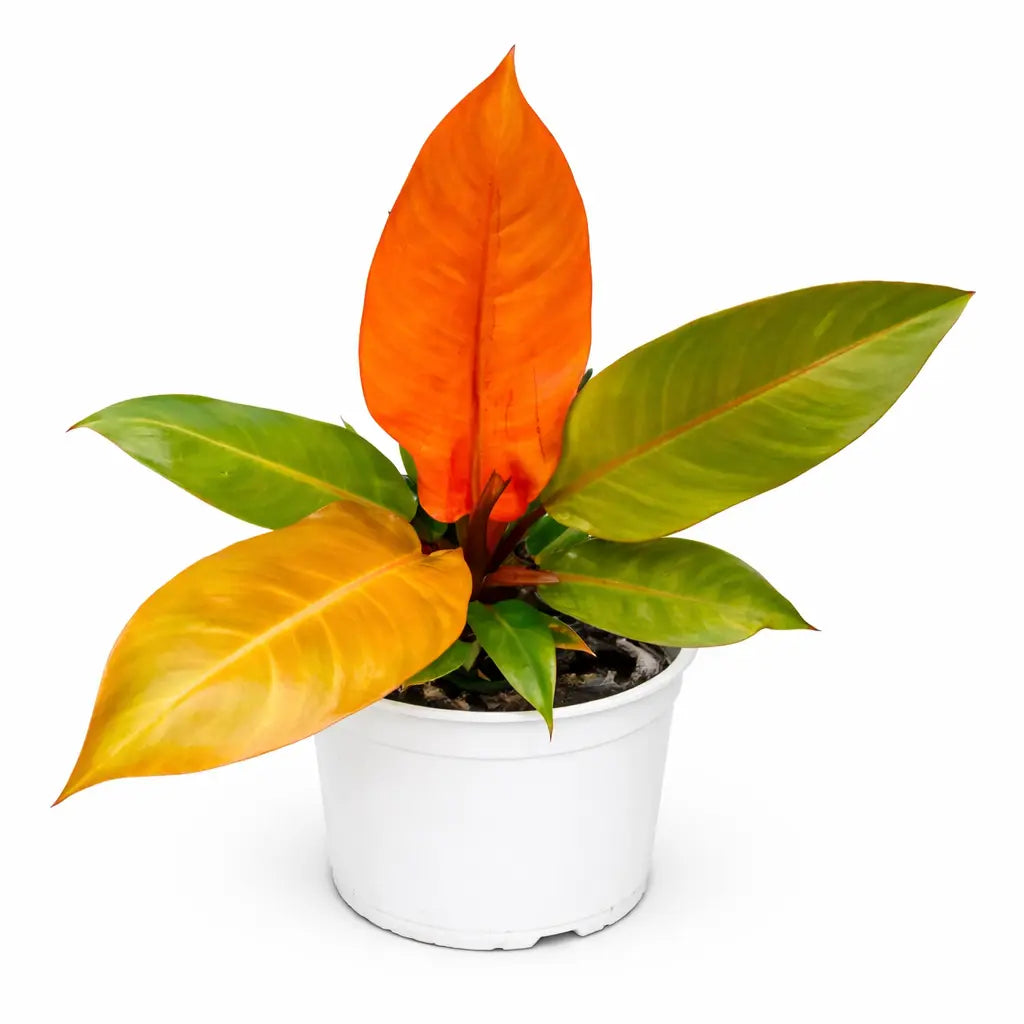
philodendron autumn queen Philodendron 'Prince of Orange'The Philodendron 'Prince of Orange' is one of those rare plants that earns its name without any exaggeration. Every new leaf that unfurls does so in vivid orange deep, saturated, genuinely the colour of a ripe citrus then spends the following weeks travelling through copper and amber and chartreuse before settling into the rich, glossy dark green of a mature leaf. Because the plant pushes new growth continuously, multiple stages of this journey are

The Philodendron 'Prince of Orange' is one of those rare plants that earns its name without any exaggeration. Every new leaf that unfurls does so in vivid orange — deep, saturated, genuinely the colour of a ripe citrus — then spends the following weeks travelling through copper and amber and chartreuse before settling into the rich, glossy dark green of a mature leaf. Because the plant pushes new growth continuously, multiple stages of this journey are always visible simultaneously: a fully orange new spear at the centre, copper leaves mid-transition, and deep green mature leaves forming the outer canopy. No two moments in the growing season look quite the same. A hybrid of the *Philodendron erubescens* lineage — *erubescens* meaning "blushing" in Latin, a name suddenly made literal by the Prince of Orange's extraordinary leaf colour — it is entirely self-heading: it grows as a compact, symmetrical rosette without climbing, without needing a moss pole, and without taking over a room. At 60–90 cm at maturity it is perfectly scaled for desks, shelves, and tabletops, and it is one of the fastest-growing self-heading Philodendrons available.

💡 Stable Colour — This Is Not Variegation The orange colouration of the Prince of Orange is genetically locked into the plant's growth cycle — it is not chimeric variegation and it does not revert. Every new leaf this plant produces will emerge orange, without exception. The colour is driven by pigment expression in new growth that fades as chlorophyll develops and the leaf matures — a reliable, repeatable process. The intensity of the orange phase is directly controlled by light: brighter indirect light = more vivid, longer-lasting orange before the leaf greens up. Lower light = the orange phase is shorter and the leaf transitions to green faster. More light is the single most effective tool for keeping the display as vivid as possible.
🌿 Self-Heading Habit — No Pole, No Climbing, No Drama Unlike the majority of collector Philodendrons, the Prince of Orange does not climb and does not need support. It grows as a compact, upright rosette, producing new leaves from the central growing point and expanding outward symmetrically. This makes it one of the most practical collector aroids available — ideal for desks, console tables, windowsills, and shelves where a climbing vine would be out of place. Simply rotate the pot a quarter turn every few weeks to ensure even light exposure and a balanced, symmetrical form.
☀️

Light

Bright indirect light — the most important factor for a vivid, long-lasting orange display. An east or west-facing window is ideal; a south-facing window with a sheer curtain works well. The orange phase is most intense and lasts longest in bright conditions — in lower light the new leaves transition to green quickly and the distinctive colour display loses much of its impact. No direct harsh afternoon sun — it scorches and bleaches the leaves. Gentle morning sun is fine and beneficial. A grow light at 12–14 hours is excellent and produces the most consistently colourful new growth.

💧

Watering

Allow the top 3–5 cm to dry before watering thoroughly. The Prince of Orange prefers to dry out a little more between waterings than moisture-loving aroids — consistent soggy soil causes root rot faster in self-heading forms. Use room-temperature filtered water where possible. Empty the saucer after watering; never allow to sit in standing water. Reduce frequency slightly in winter but never allow to dry out completely. Check weekly; water when the top layer is clearly dry rather than just slightly dry.

💦

Humidity

50–70% preferred — a humidifier is beneficial but not essential. The Prince of Orange is more humidity-tolerant than many collector aroids and adapts well to typical Indian indoor conditions. Keep away from cold AC drafts and heating vents. Do not mist directly onto the leaves — water sitting on the new orange leaves encourages brown spotting, particularly on the tender young growth. India's tropical climate is naturally adequate for outdoor or semi-outdoor growing.

🌱

Growing Media

Well-draining aroid mix — 40% quality potting soil, 25% orchid bark, 25% perlite, 10% coco coir. pH 5.5–7.0. The mix must drain freely; self-heading Philodendrons are more susceptible to root rot from compacted, moisture-retentive mixes than climbing forms. Repot every 1–2 years in spring, one pot size up — the plant prefers to be slightly snug rather than over-potted. A pot with drainage holes is essential; terracotta is a good option for extra drainage insurance.

🌾

Feeding

Balanced liquid fertilizer at half strength every 2–3 weeks in spring and summer. The fast growth rate means consistent feeding during the growing season is visibly rewarded — larger leaves and more frequent new growth flushes. Apply to moist soil only. Flush every 3 months to prevent mineral salt build-up. Stop feeding in autumn and winter. Avoid high-nitrogen formulas — they push very fast leafy growth that outpaces the plant's structural development.

⚠️ Common Issues & Quick Fixes

New Leaves Coming Out Green, Not Orange

Insufficient light — the most common complaint. The orange phase shortens and fades dramatically in low light; in deep shade new leaves can emerge barely orange at all. Move to a significantly brighter indirect position or add a grow light. The colour will return to full intensity within 1–2 new growth cycles in better light. This is not reversion — the plant cannot revert; it is purely a light response.

Brown Spots on New Orange Leaves

Water contact on tender new leaves — do not mist; ensure watering does not splash onto unfurling leaves. Also check for thrips, which target new growth specifically: silver streaking or distorted unfurling leaves indicate thrips. Treat with spinosad spray every 5–7 days for 4 weeks and quarantine immediately.

Yellow Leaves

Overwatering or root rot — allow the top 3–5 cm to dry before watering. One older lower leaf yellowing as new growth pushes is normal cycling. Widespread yellowing with soggy soil: unpot, inspect roots, trim any blackened or mushy sections, repot in fresh well-draining mix, and water less going forward.

Leaves Staying Small

Insufficient light, underfeeding, or the plant being too root-bound to support larger leaf production. Move to a brighter position, begin consistent feeding every 2–3 weeks, and check whether the plant needs repotting — roots circling the base of the pot indicate it is ready for the next size up.

Leggy or Lopsided Growth

The plant is reaching toward its light source — rotate a quarter turn every 2–3 weeks to maintain even, symmetrical growth. If the plant has become significantly lopsided, increase overall light levels and begin regular rotation to gradually correct the form.

📋 Quick Plant Profile

Botanical Name Philodendron erubescens 'Prince of Orange'
Name Meaning erubescens = Latin for "blushing" — the vivid orange-red new leaf colour taken to its most dramatic expression
Common Names Prince of Orange, Orange Splendor (Indian market trade name)
Family Araceae
Colour Journey Vivid orange → copper → amber → chartreuse → deep glossy green; all stages visible simultaneously
Colour Type Stable genetic trait — not variegation; every new leaf will be orange; does not revert
Colour Key More light = longer, more vivid orange phase; less light = faster transition to green
Growth Habit Self-heading rosette — does not climb; no moss pole needed; compact and symmetrical
vs. erubescens Emerald Queen Same lineage; Emerald Queen is a climber with cream variegation; Prince of Orange is self-heading with orange new growth
Light Bright indirect; no direct harsh sun; grow light excellent; low light fades orange phase
Watering Top 3–5 cm dry between waterings; well-draining mix essential; do not sit in water
Humidity 50–70%; adaptable; no misting on leaves; humidifier beneficial but not essential
Temperature 18°C–30°C; no cold drafts; thrives in Indian indoor conditions
Mature Size 60–90 cm height and spread; compact; ideal for desks, shelves, and tabletops
Growth Rate Fast for a self-heading Philodendron — new leaves in frequent succession with good light and feeding
Rotation Quarter turn every 2–3 weeks for even, symmetrical growth
Ideal For Desks, Shelves, Tabletops, Bright Rooms, Collectors, Gifting, Beginners and Experts Alike
Care Level Easy to intermediate — bright light is the one non-negotiable; everything else is forgiving
Shipping Notes
  • Free Standard Shipping on $100+ Orders to the USA.
  • Except Preorder products are shipped in 48 hours.
  • Delivery to the USA:
  1. Standard Shipping : 3-10 business days
  • If time is of the essence, please consider selecting expedited delivery for faster service.
Exchange/Return Notes
  • We offer a 30-day return/exchange service after receiving.
  • Final sale items are not eligible for returns or exchanges.
  • To process your return/exchange, please contact us at [email protected]
  • Please click here for more details>>> Return & Exchange Policy
SKU: 44042547184

Discover Niche Categories That Outsell philodendron autumn queen

Top-Converting Item to Boost Your Average Order

4.9 ★★★★★
Based on 365 reviews
Sort
Highest Rating
Newest First
Oldest First
Product Reviews
B
Verified Purchase
Blakey
Lexington, US
★★★★★ 5
Amazing mouse!
Color: Quartz Pink
Used this mouse for soo many years, it finally had the sticker peel and had to get a replacement but the color is amazing, razer software is easy to navigate, it’s quite durable and easy to setup
WAS THIS REVIEW HELPFUL?YesReportShare
Reviewed in the United States on June 7, 2026
T
Verified Purchase
Taylor
Phoenix, US
★★★★★ 5
Finally found my endgame mouse
Color: Classic Black, Color: Classic Black
Finally found my endgame mouse — perfect for lightweight lovers and RTS gamers. I've gone through a lot of mice over the years — office mice, productivity mice, various gaming mice — and I kept running into the same problem: they were either too heavy or too bulky for my taste. The Orochi V2 is the first mouse where I thought, "this is it." The weight and size are just right if you prefer a light, nimble feel in your hand. It doesn't fatigue your wrist over long sessions, and the compact form factor gives you great control without feeling like you're pushing a brick around your desk. If you play StarCraft 1 or other real-time strategy games that demand fast, precise movements, I genuinely think this is one of the best options you can find on Amazon. The responsiveness and accuracy make a noticeable difference when every click counts. Battery life is also excellent for a wireless mouse, and switching between Bluetooth and the 2.4GHz dongle is seamless. Overall, this is the mouse I keep coming back to — and I don't see myself switching anytime soon.
WAS THIS REVIEW HELPFUL?YesReportShare
Reviewed in the United States on March 25, 2026
A
Verified Purchase
Amazon Customer
Draper, US
★★★★★ 1
Very glitchy mouse won't accept clicks, made me reinstall windows
Color: White
TLDR: Ask ChatGPT about this mouse and it'll tell you that other users have reported issues with this mouse not clicking properly. It will tell you that this is a known issue with this mouse. So I'm an IT expert (programmer, been using PC's since Windows 3.1). And I could not get this mouse to work right. The mouse doesn't work right when the computer goes to sleep, and then wakes from sleep. This problem occurs on Windows 11 pro. When the mouse is connected in Bluetooth mode: First problem is, the mouse will NOT reconnect to the PC when the PC wakes from sleep, unless you have "Show notifications to connect using Swift Pair" disabled in windows Bluetooth settings. But setting is on by default. Second problem is, even with this setting disabled, and even if the mouse successfully reconnects when the computer wakes up, the computer will NOT accept clicks when it wakes up. This mouse apparently drops a phantom click that it never releases. The only way I could find to get rid of that phantom click is by pressing CTRL+ALT+DEL every time the computer wakes. This resets the phantom click and the mouse would function normally. But it's super annoying to have to press CTRL+ALT+DEL every time the PC wakes, especially since this mouse is supposed to be a gift to my little girl, I don't want her to have to deal with it not working perfectly. Also the mouse would sometimes stop accepting clicks even in the middle of playing games, but this only happened rarely in Bluetooth mode. On the wireless USB mode: The mouse cursor is NOT visible when windows first boots. You can't use the mouse to get to the box to type your PIN number to unlock the computer. You must use the keyword to get into windows, and then the cursor appears. This problem doesn't happen when using the mouse in Bluetooth mode, only in the wireless USB mode. And then the phantom click issue is MUCH more frequent in the wireless USB mode, and doesn't require the computer to wake from sleep, but happens randomly even in the middle of playing games... suddenly you can't click anything. And when waking from sleep, or when the mouse "goes to sleep", when it wakes up there's issues with clicks... and sometimes the cursor isn't even visible. Connecting a second mouse: When the computer stops accepting clicks, then even the second mouse would not be able to click. All connected mouses would stop being able to click. But this problem of not being able to click, would ONLY occur if the Razor Orochi V2 mouse was connected to the computer either via Bluetooth or wireless USB. If I disconnected the Orochi V2 mouse, then the problem never happens. So it's definitely this mouses's fault. But initially I didn't realize this mouse was the culprit. Because it affected all connected mice. So I thought, at first, that it was a windows issue... maybe a bad driver I had installed in the past. So I ended up reinstalling windows, trying to fix any potential driver issues. It wasn't until after that, when I discovered that the problem was this mouse all along. I was super upset to have reinstalled windows, and lost all my software and settings, only to then discover that the problem was still there and it was this mouse all along. As for getting my money back, amazon did not offer me an option to return the mouse and get a replacement. It only lets me send it back for a full refund. No option for replacement. So I think I bought this mouse when it was on sale. So it seems like they are expecting me to send it back, and then repurchase it at the new higher price, if I want to try it again. It's possible mine was simply defective. I did every imaginable thing to try to get this mouse to work. The mouse I had was brand new from Razor, but it was running an old firmware. I did a firmware update to version 1.03.00 (it was running version 1.02.00 when it arrived). I can confirm that firmware update did NOT fix the problem with the phantom clicks. I also set all the related devices in my device manager to not go to sleep, including the USB slots. That did NOT fix the problem with the phantom clicks. I also, at the advice of chatGPT, did a bunch of registry edits, none of which fixed the problem. I also, at the advice of chatGPT, wrote my own c# application, which attempted in various ways to force the mouse to release the phantom click, at least when the computer would wake up. I was trying to mimic the behavior of pressing CTRL+ALT+DEL. After many hours of coding, I was unable to programmatically correct the problems with this mouse. I really wanted this mouse to work because it's wireless, and its small, so it fits my daughter's hand. I'm now having to return this mouse at my time and expense, no option for replacement, lost whatever discount I got from the previous sale, and I lost days of my life trying to fix this mouse, and I lost some of my software and settings from the reinstallation of windows, so I have work to do just to get my daughter's computer back to normal again. Terrible experience. Conclusion: Ask ChatGPT about this mouse and it'll tell you that other users have reported issues with this mouse not clicking properly. It will tell you that this is a known issue with this mouse.
WAS THIS REVIEW HELPFUL?YesReportShare
Reviewed in the United States on November 7, 2025
M
Verified Purchase
Melissa M
Los Angeles, US
★★★★★ 5
Perfect mouse. Period.
Color: Black and Gold, Color: Black and Gold
LOVVVVEEEEE this mouse!!!! 20/10. I bought this for my new laptop and it was such a great value. I fell in love with how smooth and sleek it is, and how incredibly QUIET it is! This is the main reason I bought it, for the silence and the fact that it doesn’t click click click. So I immediately bought one for work since the one I have at work is so loud and clackety. Game changer. These are amazing. Love how they look, love how they feel in my hand using them, love how they work when using a computer, love how they fall asleep and save battery when not in use, love how they don’t make clicking noises or scrolling noises. Sooooooo good!!! Oh and love the price.
WAS THIS REVIEW HELPFUL?YesReportShare
Reviewed in the United States on May 9, 2026
A
Verified Purchase
AnxiousAmazon
Birmingham, US
★★★★★ 5
Very durable and pretty 😍
Color: Mint Green to Purple
The purple-mint gradient color is so pretty. It works well and feels nice in my hand. The buttons don't make a lot of noise, which is a bonus. Good for the price and haven't had any issues yet. You only need one battery and it lasts a long time. Installation is easy, just plug in the USB receiver, switch the button underneath to ON and you're good to go. No Bluetooth needed.
WAS THIS REVIEW HELPFUL?YesReportShare
Reviewed in the United States on May 22, 2026

recommand products