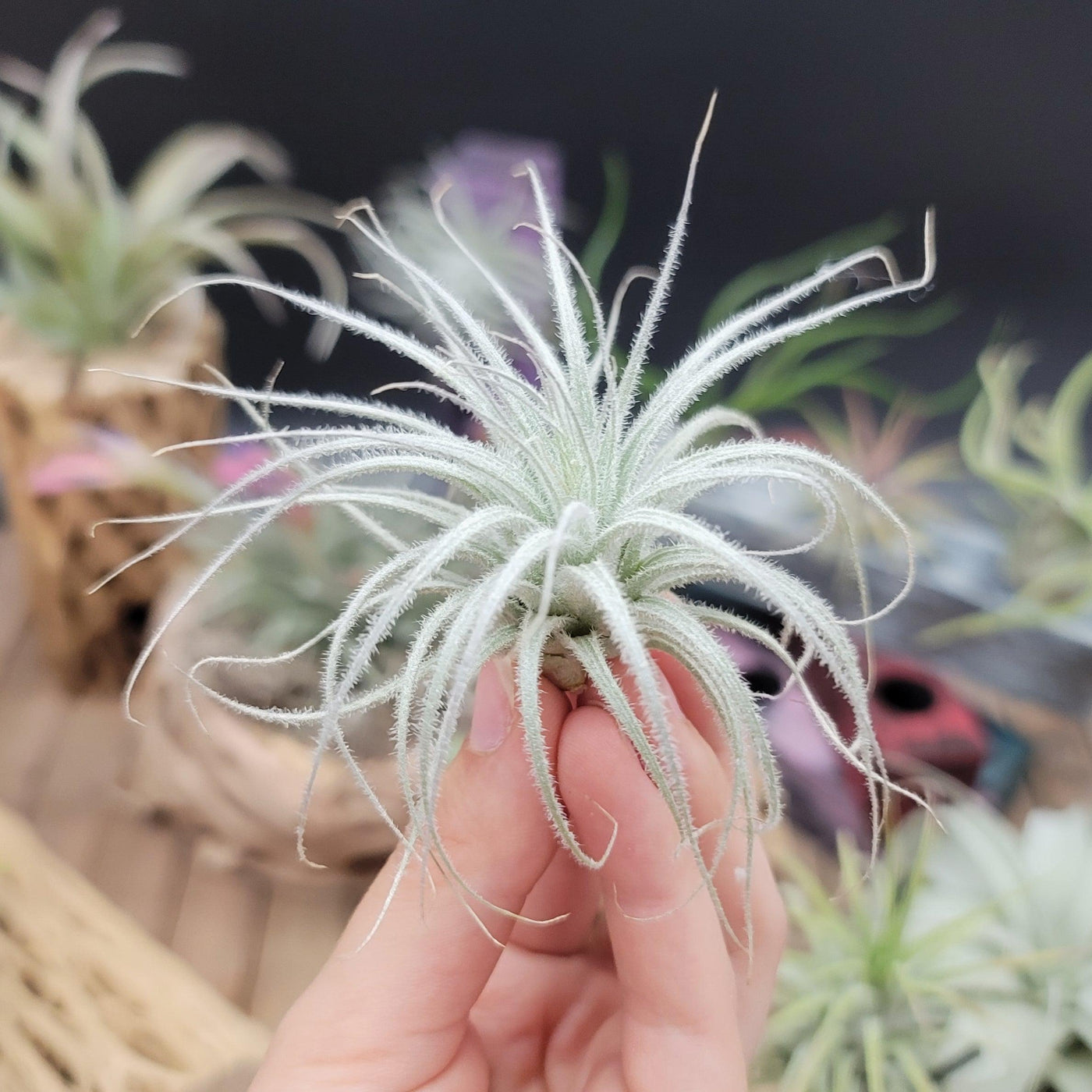
desert air plants Shop For Tillandsia Tectorum Ecuador| Rare Air Plant
SKU: 43487056743
desert air plants

desert air plants Shop For Tillandsia Tectorum Ecuador| Rare Air Plant

Sale price$26.68 Regular price$29.64
Save 10%

Shipping Estimate
USA
  • USA
  • CAN

Ships within 48 hours · Estimated delivery Jul 7 - Jul 12

Promo Codes Available:

For Your Every Summer RSVP, with Code: SUMMER15

Description

desert air plants Shop For Tillandsia Tectorum Ecuador| Rare Air Plant*Air plant only, cholla pot sold separately The Tillandsia tectorum ecuador is a xerophytic low maintenance plant that needs more direct light and less water than any other Tillandsia. Native to the arid Andes in Peru and Ecuador, this Bromeliaceae family member has its leaves adapted for extreme weather conditions. Thus, the dense fuzzy white trichomes reflect the ultra violet rays in native conditions. This plant grows anywhere between 6 to 8 inches

*Air plant only, cholla pot sold separately

The Tillandsia tectorum ecuador is a xerophytic low-maintenance plant that needs more direct light and less water than any other Tillandsia. Native to the arid Andes in Peru and Ecuador, this Bromeliaceae family member has its leaves adapted for extreme weather conditions. Thus, the dense fuzzy white trichomes reflect the ultra-violet rays in native conditions. This plant grows anywhere between 6 to 8 inches but can be shorter or taller depending on the growing needs. The air plant is lightweight due to its snowball appearance. This winter-dormant Tectorum Ecuador grows slowly at a snail’s pace with the potential to bloom anytime during the year.

Growth Rate
The Tectorum Ecuador air plant is hugely slow-growing.

Flowering
The light pink Tillandsia flower grows out of reddish bracts on a mature Tectorum air plant.

Watering and Feeding
Compared to all other Tillandsias, the Tillandsia tectorum ecuador demands less watering due to the presence of so many trichomes. Soaking in water is a big no. Misting once every third week is ideal. This plant should be completely dry within an hour of misting. In drier climates, the frequency of misting may be increased, and in a humid climate, it may be decreased.

Soil
No soil is required for the plant. An essential Tillandsia Tectorum care tip is surrounding your air plant with rocks, sand, sea glass, or shells but not moss or soil.

Hardiness
The Tillandsia tectorum ecuador air plant grows well in hardiness zones of 10 and above. It is crucial to note that these air plants cannot tolerate temperatures less than 30° to 40°F (-1.1° to 4.4°C).

Light
Another important Tectorum Ecuador air plant care tip is that the plant grows well in direct sunlight.

Propagation
Offsets at the base of the air plant necklace are the best way for propagation.

The beautiful snowballs of drought-resistant Tectorum Ecuador are exceptionally popular. With their marked distinct identify, your air plant collection will go a notch higher with these around.

Shipping Notes
  • Free Standard Shipping on $100+ Orders to the USA.
  • Except Preorder products are shipped in 48 hours.
  • Delivery to the USA:
  1. Standard Shipping : 3-10 business days
  • If time is of the essence, please consider selecting expedited delivery for faster service.
Exchange/Return Notes
  • We offer a 30-day return/exchange service after receiving.
  • Final sale items are not eligible for returns or exchanges.
  • To process your return/exchange, please contact us at [email protected]
  • Please click here for more details>>> Return & Exchange Policy
SKU: 43487056743

Discover Niche Categories That Outsell desert air plants

Top-Converting Item to Boost Your Average Order

4.2 ★★★★★
Based on 1817 reviews
Sort
Highest Rating
Newest First
Oldest First
Product Reviews
J
Verified Purchase
J. Almeida
Los Angeles, US
★★★★★ 1
Good product, I suspect, if it works. (Also Marketing Needs Improvement)
UPDATE: Nope, it's just the hub. :( It's either defective or not a good product, which is unfortunate. The stutter issue has been resolved, but I can still not use the dock to push an image to my secondary monitor (1080p). I spent several hours this evening updating drivers for my Lenovo Thinkpad E15 Gen2 (AMD) without success. FYI: This laptop DOES support PD+DP through USB-C, something I confirmed before trying to go down the USB-C route in an attempt to replace my ancient Diamond USB-A dock. An image was never sent to my second monitor, whether connected via HDMI or DP through the hub. In all cases, the monitor IS recognized by Windows, so some information is being communicated, just not an image to the monitor. During every attempt, when the monitor was first plugged in, responsiveness in Windows would stutter, lag, and generally respond slowly to my KB+M inputs until, eventually, the laptop caught up and was OK. I am highly disappointed and am considering returning both products, but the USB-C dock is definitely returning. It would be nice, but I don't need a 100W charger. My hope of replacing my current USB-A dock is diminishing at the price point I was hoping for, so we shall see if it's up to the task of the new 2K monitor I have on the way and go from there. Original: Buyer be cautioned: The Anker 565 USB-C also needs power for itself, which is evident if you think about it, but it's not stated anywhere that I could find, and it may not dawn on you until things aren't working quite right. Lack of power could cause many issues I've read about in reviews. The issue: Mouse movement would stutter every 5-10 seconds. Though Windows recognized my HDMI monitor in Device Manager/Display settings, no image was sent to it through the Anker hub. Current theory: So, the manufacturer's 65W USB-C charger for my laptop cannot FULLY power the hub with one connected HDMI monitor, two USBs, and Ethernet through the USB-C hub. I did not test the two USB devices (Keyboard and headset) as there was little need once the stuttering began, which was immediate. I have an Anker Nano 100W arriving tomorrow, and I will update the review once I've re-tested. Suggestion: My ask to Anker would be to *estimate* the power draw of their dock and list it somewhere with many warnings, etc. If they wanted to go above and beyond and add averages for peripherals and the like, that would be amazing, but if not, I would understand, as I'm sure that information could become dated fast. A power warning would have prompted me to consider the power charging situation, and I may gone with one of their docks (About a $100 increase) instead. But now that I'm annoyed, I'll purchase a 100W charger that I can use for my work laptop and elsewhere as needed. :) They are still getting my money, but not as much. They make amazing products, but small details like this matter to me as a consumer.
WAS THIS REVIEW HELPFUL?YesReportShare
Reviewed in the United States on August 26, 2024
I
Verified Purchase
icsttt
Fort Morgan, US
★★★★★ 5
Anker 11 in 1 Docking station as a Starter.
This is an entry level addition to a PC. If more ports needed then the 14 in 1 or a powered Hub.
WAS THIS REVIEW HELPFUL?YesReportShare
Reviewed in the United States on June 3, 2026
T
Verified Purchase
Theodore Pankiewicz
Charlottesville, US
★★★★★ 5
It’s worth it
They sick with the insurance they cllaim
WAS THIS REVIEW HELPFUL?YesReportShare
Reviewed in the United States on June 1, 2026
A
Verified Purchase
Adam & Charlotte
Lake Worth, US
★★★★★ 5
great service
filed a claim and was resolved within 5 mins
WAS THIS REVIEW HELPFUL?YesReportShare
Reviewed in the United States on May 29, 2026
D
Verified Purchase
Dori!
Lowell, US
★★★★★ 5
Best decision ever!
I purchased the protection plan to cover my heat press. I didn't think that I would need it nor ever use it but wanted to be sure I had some sort of warranty in place since I was spending a large amount of money. I did have to file a claim with Asurion and they were great to work with! They provided me with the assurance that I would not have to come out of pocket again to fix my machine. It is worth the money to get the coverage. You never know when you will need it.
WAS THIS REVIEW HELPFUL?YesReportShare
Reviewed in the United States on March 19, 2025

recommand products