Pay in installments of $7.47 with
 ,
,
 and
and

Shipping Estimate
USA
- USA
- CAN
- USA
- CAN
Ships within 48 hours · Estimated delivery Aug 4 - Aug 9
 Promo Codes Available:
For Your Every Summer RSVP, with Code: SUMMER15
Description
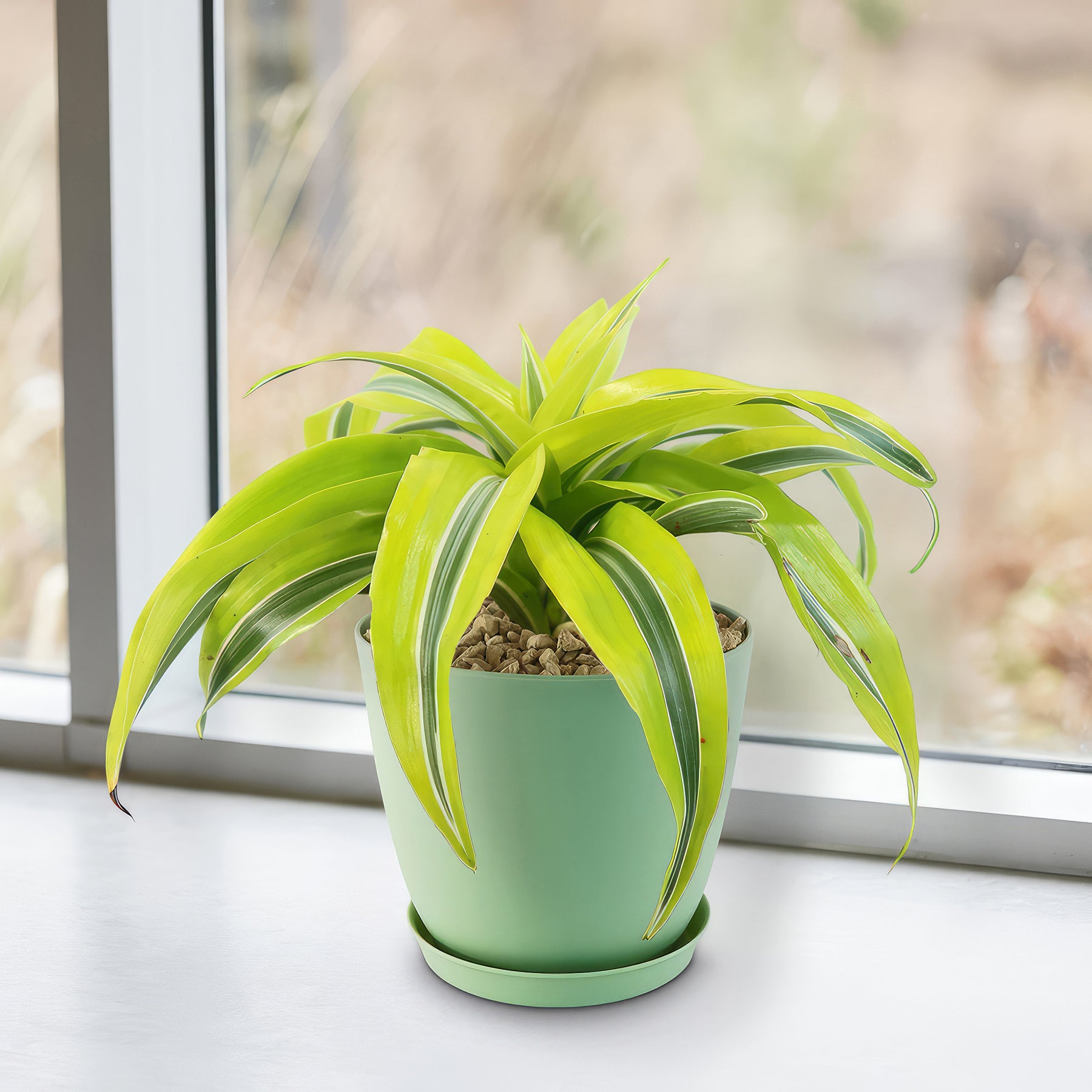
tropical premium dracaena Lemon Surprise PlantThe Dracaena Lemon Surprise is a striking and low maintenance houseplant admired for its lively, lime green foliage and easy adaptability. This variety is especially popular because of its twisting, variegated leaves that feature lime green, dark green, and creamy white streaks. Its tolerance to low light, infrequent watering, and typical household conditions makes it a go to option for offices, apartments, and homes where fuss free greenery is
The Dracaena ‘Lemon Surprise’ is a striking and low-maintenance houseplant admired for its lively, lime-green foliage and easy adaptability. This variety is especially popular because of its twisting, variegated leaves that feature lime green, dark green, and creamy white streaks. Its tolerance to low light, infrequent watering, and typical household conditions makes it a go-to option for offices, apartments, and homes where fuss-free greenery is appreciated.
Native to Tropical Africa, the Dracaena ‘Lemon Surprise’ features long, lance-shaped leaves that grow tight, whorled rosettes atop upright stems.
The foliage is its main attraction, with bright, glossy textures and elegantly twisted shapes that give the plant a sculptural appearance.
When mature, it can grow up to 3 feet tall indoors, with a spread of 2 feet, making it a compact choice for tabletops, shelves, or floor containers.
The lemon surprise plant may occasionally bloom in spring and summer under ideal conditions, with small, fragrant white flowers.
However, the blooms are not showy and are typically overshadowed by the plant’s stunning foliage, which remains the primary ornamental value.
What sets ‘Lemon Surprise’ apart from other Dracaena cultivars is the spontaneous variegation and twisted leaf formation, which gives the plant a wild, energetic look.
Unlike many other variegated varieties, the coloration remains relatively stable across different light levels, making it a versatile design plant for both bright and dim rooms. It is also known for being one of the most resilient Dracaenas, forgiving of neglect and adaptable to different environments.
When and How to Water Your Lemon Surprise Plant
Dracaena ‘Lemon Surprise’ is a drought-tolerant plant that requires moderate watering and prefers its soil to dry out slightly between waterings. As a drought-tolerant species, overwatering is a more serious risk than underwatering. The lemon surprise plant prefers watering once every 10–14 days in spring and summer months, and once every 3–4 weeks during fall and winter.
From March to August, during the growing season, water the plant thoroughly every 10 to 14 days, allowing the top 2 inches of soil to dry out completely before the next watering. This active growth period requires a more consistent moisture level, but still far less than tropical plants. Use room-temperature, filtered water if possible, and always empty drainage trays to avoid soggy roots.
From September to February, in the dormant season, reduce watering to every 3 to 4 weeks, giving just enough moisture to prevent shriveling. At this time, the plant's metabolic rate slows, and too much water can lead to root rot. Always check the soil dryness before watering during this period.
Light Requirements – Where to Place Your Dracaena Lemon Surprise
When grown indoors, the Dracaena ‘Lemon Surprise’ thrives in bright, indirect light for 6 to 8 hours per day but can tolerate lower light conditions, making it ideal for offices and indoor corners.
Place it near a north- or east-facing window, or a few feet away from a south-facing one with filtered light. Too little light may result in leggy growth and faded variegation.
When grown outdoors, this plant does best in dappled sunlight or light shade for about 4 to 6 hours per day, and should be protected from harsh afternoon sun.
In shaded patios or under trees, it can grow well as a container plant during warmer months.
Never expose it to direct sunlight for prolonged periods, especially in hot climates, as it may cause scorched leaves.
If moving between indoor and outdoor environments, gradually acclimate the plant to new light levels to prevent shock or sunburn. Abrupt changes in lighting conditions can lead to yellowing leaves or slowed growth.
Optimal Soil & Fertilizer Needs
The Dracaena ‘Lemon Surprise’ grows best in loose, well-draining potting soil with a slightly acidic to neutral pH, and should be fertilized once a year in spring. Planting them in ordinary soil will result in compacted roots, stunted growth, and most likely root rot. Instead, make or buy a well-draining potting mix, or ideally use our specialized potting mix, opens in a new tabGo to soil cactus mix blend 1 gal 4 qt cacti succulent dirt compost growing media that contains 5 natural substrates and mycorrhizae to promote the development of a strong root system that helps your lemon surprise plant
Fertilize your plant once a year in spring with a balanced, water-soluble houseplant fertilizer diluted to half strength. Over-fertilizing can lead to salt buildup and leaf tip burn, so less is more with Dracaenas. Always water before and after applying fertilizer to prevent root damage.
Avoid fertilizing in the dormant period (fall and winter), as the plant's nutrient needs drop significantly, and added fertilizer may stress the roots. You can resume feeding in early spring when new growth appears.
Hardiness Zones & More
In the United States, the Lemon surprise is mostly an indoor plant, but if you live in southern Florida or Hawaii, then you can cultivate it outdoors in USDA zones 10-11.
Place it in a shaded or semi-shaded area with filtered light. It is not frost-hardy and must be brought indoors if temperatures fall below 50°F.
If grown outdoors seasonally, it should be transitioned back indoors in early fall before night temperatures dip, ideally in a spot with similar light and humidity levels to avoid stress.
How to Best Grow a Lemon Surprise Houseplant Indoors
When grown indoors, Dracaena ‘Lemon Surprise’ prefers temperatures between 65°F and 80°F, with average household humidity and indirect light. It adapts well to indoor environments and will tolerate typical indoor fluctuations as long as it’s kept away from cold drafts or heating vents. A humidity level of around 40–50% is ideal.
Wildlife – Lemon Surprise Plant Attracts the Following Friendly Pollinators
Dracaena ‘Lemon Surprise’ is primarily a foliage plant and does not attract pollinators in a meaningful way, as it rarely flowers indoors. While outdoor specimens may produce small, fragrant flowers, they are not a major attractant for pollinators like bees or butterflies.
According to the ASPCA, Dracaena species are mildly toxic to dogs and cats if ingested in large amounts, causing symptoms such as vomiting, drooling, and lack of coordination. Bird owners should also exercise caution, as no Dracaena species are considered bird-safe. However, it is safe to handle and touch, making it a popular choice for indoor decoration in homes with pets as long as precautions are taken to prevent ingestion.
How to Propagate Your Dracaena Lemon Surprise Plant
The Dracaena ‘Lemon Surprise’ is best propagated through stem cuttings, which can root easily in water or soil with the right technique. To propagate, select a healthy stem with at least 3–5 inches of length and several healthy leaves. Cut just below a node using sterilized scissors or pruning shears. If rooting in water, place the cutting in a glass with only the bottom inch submerged and change the water every few days.
Once roots reach 1–2 inches in length, transplant into well-draining soil. If rooting in soil directly, use a rooting hormone and keep the medium slightly moist in bright, indirect light. Rooting usually takes 4–6 weeks, and new shoots may emerge within two months.
Key Takeaways
- This plant's striking foliage with lime-green, cream, and dark green variegation adds a lively, tropical appearance to indoor spaces.
- The compact, upright growth habit makes it ideal for use as a tabletop plant, office décor, or narrow corners, growing up to 2-3 feet tall indoors.
- Extremely drought-tolerant and low maintenance, requiring only occasional watering and thriving even with neglect, ideal for busy or beginner plant owners.
- The lemon surprise plant acts as a natural air purifier, helping to remove indoor toxins such as formaldehyde and benzene while improving air quality.
- The lemon surprise plant thrives in bright, indirect light but can also tolerate low light levels, making it one of the most adaptable and forgiving indoor plants available.
The Bottom Line
Overall, the Dracaena ‘Lemon Surprise’ is a vibrant, low-care houseplant ideal for beginners and collectors alike. With its striking variegated foliage in lime and dark green tones, it brings visual interest to any room. Its drought-tolerant nature, flexibility with indoor lighting, and ease of propagation make it a perfect addition to modern living spaces. Whether placed in a bright corner or grown on a shaded patio in warm climates, this plant offers reliable beauty with minimal effort.
Shipping Notes
- Free Standard Shipping on $100+ Orders to the USA.
- Except Preorder products are shipped in 48 hours.
- Delivery to the USA:
- Standard Shipping : 3-10 business days
- If time is of the essence, please consider selecting expedited delivery for faster service.
Exchange/Return Notes
- We offer a 30-day return/exchange service after receiving.
- Final sale items are not eligible for returns or exchanges.
- To process your return/exchange, please contact us at [email protected]
- Please click here for more details>>> Return & Exchange Policy