Pay in installments of $6.94 with
 ,
,
 and
and

Shipping Estimate
USA
- USA
- CAN
- USA
- CAN
Ships within 48 hours · Estimated delivery Jul 6 - Jul 11
 Promo Codes Available:
For Your Every Summer RSVP, with Code: SUMMER15
Description
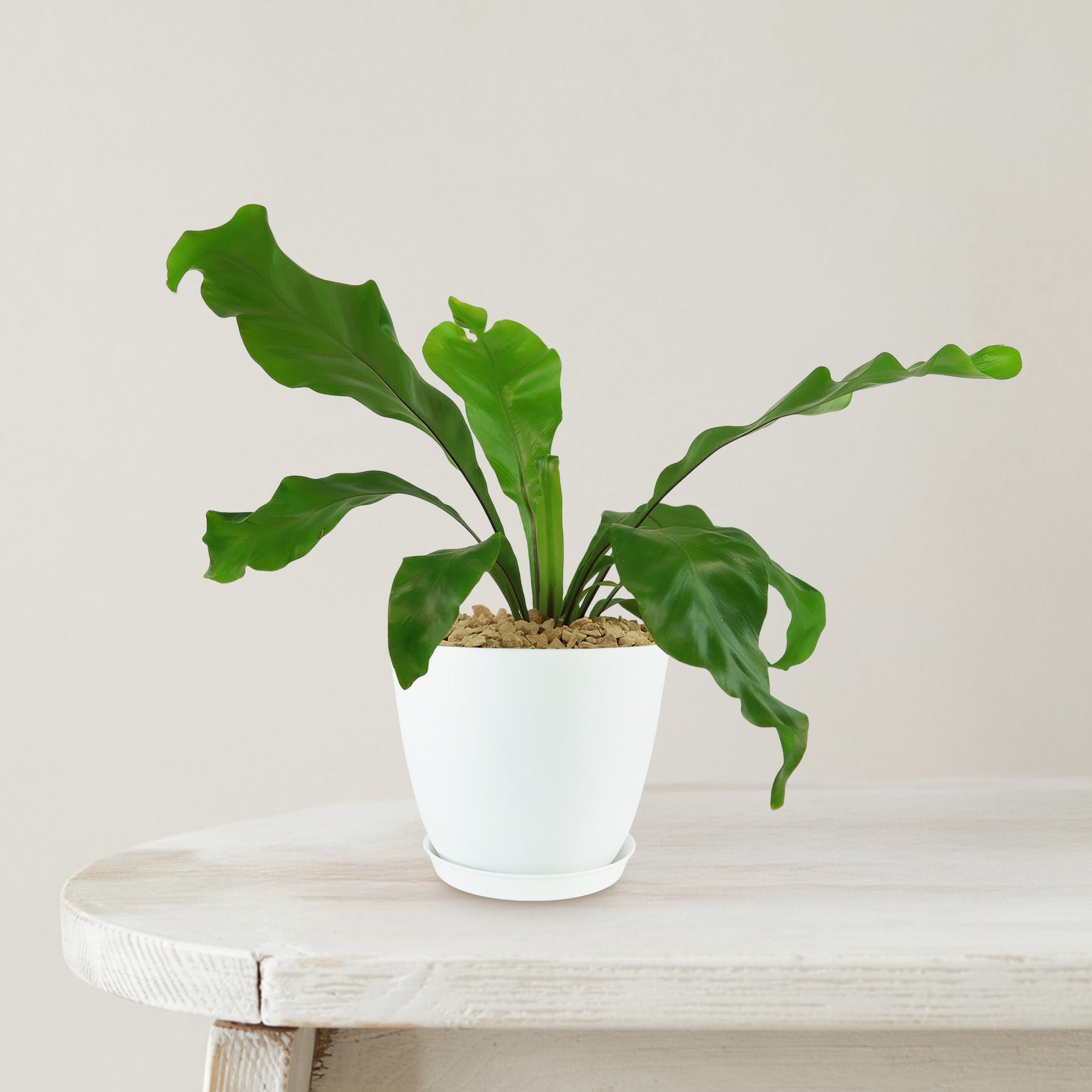
indoor birds nest plant Bird’s Nest Fern ‘Asplenium nidus’ 6" Pot / White / Without PotThe Birds Nest Fern, known as Asplenium nidus, is a striking fern prized for its bold, wavy fronds and lush, sculptural appearance. This fern is especially admired for how it naturally creates a nest of fronds that gently unfurl from a central point, resembling a birds nesthence the common name. Native to the tropical rainforests of Southeast Asia, Australia, and the Pacific Islands, Birds Nest Fern thrives in warm, humid, and shaded environments. In
The Bird’s Nest Fern, known as Asplenium nidus, is a striking fern prized for its bold, wavy fronds and lush, sculptural appearance. This fern is especially admired for how it naturally creates a “nest” of fronds that gently unfurl from a central point, resembling a bird’s nest—hence the common name.
Native to the tropical rainforests of Southeast Asia, Australia, and the Pacific Islands, Bird’s Nest Fern thrives in warm, humid, and shaded environments. In the wild, it often grows epiphytically, nestled high in tree canopies where it collects organic debris and moisture. This natural habitat gives clues to how it prefers to be grown at home: warm, indirect light and high humidity are key.
The bird’s nest fern plant features bright, glossy green fronds that grow in a circular rosette pattern, giving the plant a neat, symmetrical look.
Unlike many ferns that have finely divided leaves, Asplenium nidus has broad, tongue-shaped fronds with rippled or wavy margins.
These leathery leaves add strong architectural interest and a bold textural contrast in both houseplant collections and tropical landscape beds.
When mature, Bird’s Nest Fern can reach about 4 feet tall and 3 feet wide, depending on conditions.
Indoors, it typically stays closer to the lower end of that size range unless given ample humidity and consistent warmth.
It does not grow aggressively or require frequent pruning, making it a low-maintenance plant for those who want lush greenery without the fuss.
The Bird’s Nest Fern does not produce flowers in the traditional sense, as it is a true fern and reproduces via spores. These spores are produced in small rows or dots on the undersides of mature fronds. While not as showy as flowers, the reproductive structures give the plant a botanical charm and interest for fern collectors and hobbyists.
One of the unique aspects of Asplenium nidus is its adaptability as both an indoor and outdoor plant in warmer climates, as well as its ability to improve air quality. It is often placed in bathrooms and kitchens thanks to its love of humidity and tolerance of indirect light.
When and How to Water Your Bird’s Nest Fern
The Bird’s Nest Ferns are mildly drought-tolerant; they store water in their leathery fronds. Always water thoroughly when the top 1–2 inches of soil feel dry. Avoid letting the soil completely dry out, especially during active growth, as it can cause browning tips and stunt development. Bird's Nest Ferns should be watered deeply every 5-7 days from spring to early fall, then reduced to once every 10-14 days in winter.
From March to September, during the growing season, water every 5–7 days using about 1/3 to 1/2 cup for small to medium pots, making sure water drains freely. Keep humidity high and mist occasionally if your indoor air is dry. Avoid watering directly into the rosette to prevent rot.
From October to February, during the dormant period, reduce watering to once every 10–14 days with smaller quantities, around 1/4 cup for medium containers. Let the soil mostly dry out between watering, but never become bone dry. Lower light and cooler air will slow the plant’s water needs.
Light Requirements – Where to Place Your Bird's Nest Fern
When growing indoors, the Bird’s Nest Fern thrives in bright indirect light for 6–8 hours daily, avoiding direct sunlight to protect its fronds.
Place your fern near an east-facing window or a few feet away from a south or west window filtered with sheer curtains.
It can tolerate low light but will grow more slowly. Rotate the pot occasionally to maintain even foliage.
When grown outdoors, place your Bird’s Nest Fern in bright filtered light or dappled shade for 4–6 hours a day, never in full sun.
Morning sun or deep shade under trees or patios is ideal. Avoid harsh midday rays that can burn the fronds. For either setting, too little light causes slow growth and pale leaves, while too much causes crisping or browning.
Optimal Soil & Fertilizer Needs
Bird’s Nest Fern thrives in loose, well-draining, and slightly acidic soil rich in organic matter. Planet Desert has specialized potting soil, opens in a new tabGo to soil cactus mix blend 1 gal 4 qt cacti succulent dirt compost growing media that includes an organic substrate with mycorrhizae to help with the growth of a healthy root system and help your bird's nest fern thrive. Avoid compacted or overly sandy soils that dry out too fast.
Fertilize your bird’s nest fern once a year in the spring with a balanced liquid NPK fertilizer of about 5-10-5. Over-fertilizing causes frond burns and salt buildup, so avoid feeding in the dormant season. In winter, skip fertilizing completely. The plant’s metabolism slows down and doesn’t need nutrients during rest.
Bird’s Nest Fern Indoor Requirements
When growing indoors, Bird’s Nest Fern thrives in temperatures between 65°F and 80°F, with humidity levels of at least 50% and exposure to filtered bright light. These tropical ferns are native to humid rainforests, so maintaining warmth and moisture indoors is key. Keep them away from air conditioners, heating vents, and drafty windows to avoid cold or dry air stress. Ideal indoor spots include bathrooms or kitchens where humidity is naturally higher. If needed, place the pot on a pebble tray with water or use a humidifier to boost the surrounding moisture.
Hardiness Zones & More
When growing outdoors, it is hardy in USDA zones 10–11 and prefers temperatures above 55°F, with bright indirect light and 60–80% humidity.
If temperatures dip below 50°F, bring it indoors.
Place in shaded patios, under canopies, or in fern gardens where moisture and shade are consistent.
Extended cold or dry wind exposure can cause frond browning and leaf drop, so protect accordingly. This plant is native to tropical rainforests and needs similar conditions.
Wildlife – Bird’s Nest Fern Attract the Following Friendly Pollinators
The Bird’s Nest Fern still attracts helpful insects like beneficial wasps, hoverflies, and frogs due to its moisture and form. Its wide, bowl-like rosette traps moisture, drawing in insects and tiny animals that help regulate pest populations. It’s a passive part of a healthy garden ecosystem.
According to the ASPCA, Bird’s Nest Fern is non-toxic to dogs, cats, and horses, making it a safe choice for pet-friendly homes. This makes it ideal for indoor placement where curious pets roam.
How to Propagate Your Asplenium nidus
Bird’s Nest Fern is most commonly propagated by division, not spores like other ferns. To divide, remove the plant from its pot and gently separate offshoots or pups with attached roots. Use clean, sharp scissors or hands and pot the divisions in fresh, moist soil. Avoid disturbing the central rosette, as it is the plant’s main growth point. Keep new plants warm and humid, with indirect light, until well-rooted.
Key Takeaways
- Bird’s Nest Fern is known for its bright green, leathery fronds with ruffled or wavy edges that grow in a circular rosette, mimicking a bird’s nest.
- As a true fern, it doesn’t bloom; instead, it reproduces by releasing spores from the undersides of mature fronds.
- It thrives in humidity-rich environments like bathrooms and kitchens, making it a natural choice for tropical-style interiors.
- This fern helps improve indoor air quality by filtering out pollutants and adding fresh oxygen to enclosed spaces.
- According to the ASPCA, Asplenium nidus is non-toxic to cats and dogs, making it a safe and stylish option for pet owners.
The Bottom Line
Overall, the Bird’s Nest Fern (Asplenium nidus) is a striking, easy-to-care-for fern that brings lush tropical greenery into any indoor or shaded outdoor space. With its ruffled, upright fronds forming a nest-like crown, it offers unique texture and visual interest. It’s moderately drought-tolerant, safe for pets, thrives in high humidity, and is a perfect match for beginners looking for non-fussy foliage. Whether used in containers, bathrooms, or as part of a shade garden, it rewards minimal effort with maximum impact.
Shipping Notes
- Free Standard Shipping on $100+ Orders to the USA.
- Except Preorder products are shipped in 48 hours.
- Delivery to the USA:
- Standard Shipping : 3-10 business days
- If time is of the essence, please consider selecting expedited delivery for faster service.
Exchange/Return Notes
- We offer a 30-day return/exchange service after receiving.
- Final sale items are not eligible for returns or exchanges.
- To process your return/exchange, please contact us at [email protected]
- Please click here for more details>>> Return & Exchange Policy