Shipping Estimate
USA
- USA
- CAN
- USA
- CAN
Ships within 48 hours · Estimated delivery Jul 13 - Jul 18
 Promo Codes Available:
For Your Every Summer RSVP, with Code: SUMMER15
Description
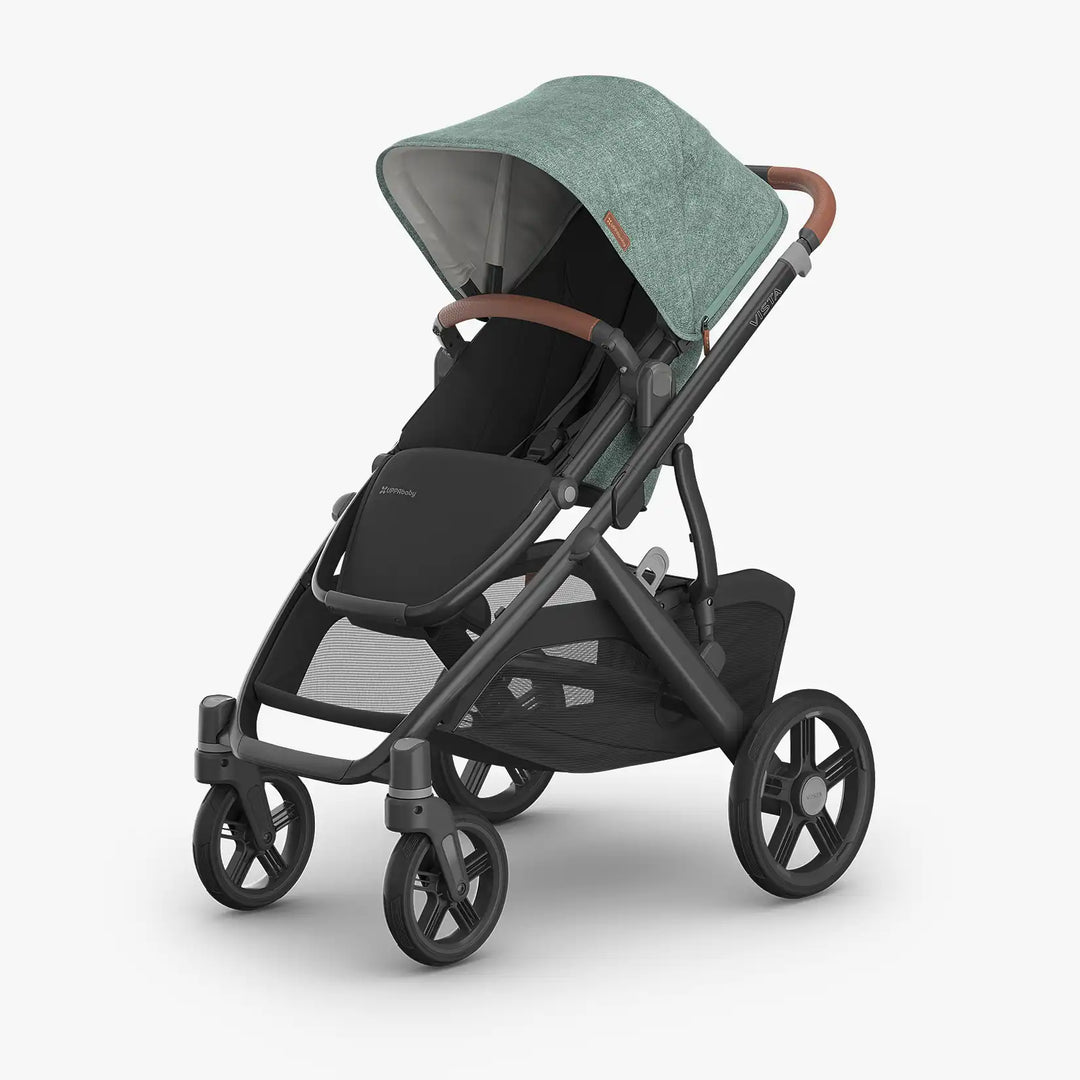
uppababy coupon codes Uppababy Vista v3by UPPAbaby Babesta Pick Best Modular Family Stroller for NYC Category: Full size strollers Modular expandable strollers Travel systems Certifications: GREENGUARD Gold JPMA Certified REACH certified leather Warranty: 3 year transferable The UPPAbaby Vista V3 is a 27. 6 lb premium modular stroller suitable from birth (with Bassinet or Infant SnugSeat) through 50 lbs, offering 30+ configurations including single, double, and triple setups. As NYC's
by UPPAbaby | Babesta Pick — Best Modular Family Stroller for NYC
Category: Full-size strollers | Modular/expandable strollers | Travel systems
Certifications: GREENGUARD® Gold | JPMA Certified | REACH-certified leather
Warranty: 3-year transferable
The UPPAbaby Vista V3 is a 27.6 lb premium modular stroller suitable from birth (with Bassinet or Infant SnugSeat) through 50 lbs, offering 30+ configurations including single, double, and triple setups. As NYC's expert baby boutique, we consider the Vista V3 the gold standard for growing families who need one stroller to do it all — from newborn on the subway to a second child in a double configuration in Central Park. Its enormous 30 lb basket, never-flat tires, FlexRide suspension, and magnetic harness buckle make it one of the most well-engineered full-size strollers on the market.
For first-time parents planning for more children, families already expecting baby number two, or anyone who wants a stroller that evolves with their family without starting over — the Vista V3 is Babesta's top recommendation for a long-haul family stroller.
|
Specifications |
|
|
Stroller weight (frame + seat) |
27.6 lbs (frame: 19.8 lbs | seat: 7.8 lbs) |
|
Folded dimensions (with seat) |
16.3" × 25.7" × 33.8" |
|
Folded dimensions (without seat) |
11.3" × 25.5" × 32.3" |
|
Unfolded dimensions |
36" L × 25.7" W × 39.5" H |
|
Fold type |
One-step; self-stands when folded; can fold with or without seat |
|
Suitable from birth? |
Yes — with Bassinet or Infant SnugSeat accessory |
|
Suitable without accessories? |
3 months to 50 lbs (toddler seat) |
|
Max child weight (toddler seat) |
50 lbs (approx. age 4–5) |
|
Max child weight (RumbleSeat) |
40 lbs |
|
Basket weight capacity |
30 lbs — one of the largest in class |
|
Seating configurations |
30+ configurations; single, double, or triple |
|
Seat positions |
Forward-facing, parent-facing, multi-position recline (one-hand) |
|
Handlebar |
Adjustable telescoping height; one-hand operation |
|
Suspension |
Enhanced FlexRide™ — frame-integrated, smooth on city pavement |
|
Tires |
Never-flat; front wheel locks with visual indicators; all-terrain wheels optional |
|
Canopy |
Extendable UPF 50+; zip-out mesh panels; water-repellent |
|
Harness |
Magnetic buckle; easy no-rethread adjustment |
|
Seat liner |
All-Weather Comfort Seat; seasonal liner + converts to mesh |
|
Certifications |
GREENGUARD® Gold; JPMA certified; REACH-certified leather |
|
Warranty |
3-year transferable |
|
Included in box |
Stroller, toddler seat, seasonal seat liner, bug shield, rain shield, storage bag |
Best For / Not For
Best For: Growing families (planning for a 2nd or 3rd child), parents who want one stroller from birth through preschool, Central Park walkers, Hudson Park strollers, parents who carry heavy loads (30 lb basket is best in class), and families building a UPPAbaby travel system with the Mesa or Aria infant car seat.
Not For: Parents who need an ultra-compact travel stroller, frequent subway folding/unfolding as a solo commuter, or those in 4th-floor walkups without an elevator. At 27.6 lbs it is not a carry-up-stairs stroller.
|
Available Colors |
|
|
Colors |
Jake (black), Greyson, Callum (blue), Kenzi (green/blue), Savannah (white/grey), Owen (charcoal mélange), Ada (beige), Julian (aqua) — plus limited editions |
|
Frame options |
Carbon (matte) |
|
Is it suitable for my baby's age? |
|
|
Newborn (0–3 months) |
Yes — with the separately sold Bassinet (lie-flat, GREENGUARD Gold certified) or Infant SnugSeat accessory. |
|
Infant (3–12 months) |
Yes — toddler seat reclined, UPPAbaby Mesa or Aria infant car seat clicks in with no adapter needed. |
|
Toddler (1–4 years) |
Yes — forward or parent-facing seat, adjustable footrest and recline, magnetic harness, up to 50 lbs. |
|
Two children |
Yes — add the RumbleSeat V3 (up to 40 lbs) below the main seat. Upper Adapters (sold separately) give more legroom between seats. |
|
Three children |
Yes — add the PiggyBack Ride-Along Board for an older sibling. Folds flat and stays attached for the full fold. |
Is it good for NYC / city use?
Yes, with context. The Vista V3 is Babesta's pick for NYC families who are settled into a neighborhood and strolling daily — think Park Slope, the UWS, Tribeca, Astoria. The FlexRide suspension handles uneven sidewalks, the basket holds a full grocery run (30 lbs), and the adjustable handlebar accommodates parents of any height for those long weekend walks. The one-step fold self-stands, so it's easy to manage in a cab or elevator building lobby.
Important NYC note: This is not a subway-carry stroller. At 27.6 lbs with a wide folded footprint, it is best suited to parents with a car, garage, or a building with elevator access. For families who want a Vista V3 AND a subway-friendly option, Babesta often recommends pairing it with a lightweight like the Joolz Aer2 for transit days.
Quick Comparison
Wider and heavier than the Bugaboo Fox and UppaBaby Cruz, but offers significantly more basket capacity (30 lbs vs ~10–22 lbs) and unmatched modularity for growing families. Lighter than the Bugaboo Donkey6 in double configuration. The Vista V3 is the clear choice when you need to expand to a double without switching strollers.
|
Car Seat Compatibility |
|
|
No adapter needed |
UPPAbaby Mesa, UPPAbaby Aria |
|
Adapter required (sold separately) |
Clek, Cybex, Bugaboo x Nuna |
What's Included
• UPPAbaby Vista V3 stroller frame
• All-Weather Comfort Toddler Seat with magnetic harness buckle
• Seasonal seat liner (for cooler months)
• Toddler seat bug shield
• Toddler seat rain shield
• Toddler seat storage bag
• 3-year transferable warranty
Optional Add-Ons Available at Babesta
• UPPAbaby Vista V3 Bassinet — for newborn lie-flat use (strongly recommended for 0–3 months)
• Infant SnugSeat — for newborn seat use without the bassinet
• RumbleSeat V3 — second seat for a second child (up to 40 lbs)
• Upper Adapters — for added legroom between two seats in double configuration
• PiggyBack® Ride-Along Board — for a third child or older sibling
• UPPAbaby Mesa Infant Car Seat — clicks in without adapters
• UPPAbaby Aria Infant Car Seat — clicks in without adapters
• Car seat adapters for Clek, Cybex, Bugaboo x Nuna
• All-Terrain Wheels (optional upgrade) — for parks, gravel, beach boardwalks
• Cozy Ganoosh — footmuff/sleeping bag for cold NYC winters
Babesta Pick — Why We Carry It
There are a lot of full-size strollers on the market, but the Vista V3 earns its place as Babesta's top recommendation for growing families for a few reasons. First, the modularity is genuinely future-proof: if you have your first child and then get pregnant again, you don’t have to sell your stroller — you just add a RumbleSeat. Second, the basket is the best in class at 30 lbs; for NYC parents doing grocery runs, that matters every single day. Third, the magnetic harness buckle sounds like a small detail until you've wrestled a 2-year-old into a non-magnetic buckle in January. And fourth, the FlexRide suspension actually handles NYC sidewalks — we’ve tested it on Warren Street outside our store, and the ride quality over cracked pavement is noticeably smoother than competitors at the same price point.
The one honest trade-off: this is not a light stroller. If you live in a walkup, we’ll have a real conversation with you about whether this is your everyday stroller or one that lives in a car. That’s the kind of guidance you get at Babesta that you don’t get online.
Babesta Services on This Purchase
When you buy the Vista V3 from Babesta, you get:
• Free in-store assembly and full stroller demo — we walk you through every fold, harness, and recline position
• Home delivery below Canal Street NYC (assembled) and same-day courier delivery in NYC/Brooklyn (unassembled)
• Hold it until you’re ready — buy it now, take it when baby arrives, no rush
• Price match guarantee — found it cheaper? We'll match it
• Registry support — add to your Babesta registry with expert guidance on compatible accessories
Frequently Asked Questions
Can I use this as my only stroller?
Yes for most NYC families in elevator buildings or with a car. If you live in a walkup, we’d recommend pairing it with a lightweight like the Joolz Aer2 for those days. The Vista V3 is a daily stroller, not a travel/carry stroller.
This being said, we find that most parents we work with need a stroller for the neighborhood, but also want another for quick trips around the city or adventures abroad. So you can use it as your one and only, but you may want to consider a lightweight for later just to make travels even easier.
Does the bassinet come included?
No — with the V3, the bassinet is sold separately. Babesta strongly recommends it for the newborn phase (0–3 months). The lie-flat position is optimal for newborns, and the UPPAbaby Bassinet is GREENGUARD Gold certified and overnight sleep ready.
Can it convert to a double stroller?
Yes — add the RumbleSeat V3 (sold separately) for a second child up to 40 lbs. The RumbleSeat attaches below the main seat. Adding the Upper Adapters (also sold separately) gives more legroom between the two children — we recommend it.
Which infant car seats are compatible without adapters?
The UPPAbaby Mesa and UPPAbaby Aria click directly onto the Vista V3 frame with no adapters needed. For Clek, Cybex, and Bugaboo x Nuna, adapters are required and sold separately. Ask our team at Babesta for the correct adapter for your car seat brand.
Also note, that when choosing your car seat, think about your whole stroller situation (one stroller or two) and find a car seat that can work with all of them. This way you have maximum choice when taking your trip.
Is it good for Central Park and outdoor walks?
Yes — the FlexRide suspension and never-flat tires handle grass, gravel, and park paths well. For more serious off-road use (beach, hiking trails), UPPAbaby sells optional All-Terrain Wheels separately.
Can I fold it with the second seat attached?
The stroller can fold with or without the main toddler seat attached. The PiggyBack Ride-Along Board also folds with the stroller attached. The RumbleSeat should be removed before folding.
Can I try it in person?
Yes — the UPPAbaby Vista V3 is on the floor at Babesta Tribeca, 56 Warren Street. Our team can walk you through the fold, the double configuration setup, the car seat click-in, and let you push it outside on the pavement.
Can I put this on my baby registry?
Yes — the Vista V3 is one of Babesta’s most-registered strollers. Setting up a Babesta registry comes with exclusive perks and services, including expert guidance on which accessories to add from day one versus which ones to wait on.
Shipping Notes
- Free Standard Shipping on $100+ Orders to the USA.
- Except Preorder products are shipped in 48 hours.
- Delivery to the USA:
- Standard Shipping : 3-10 business days
- If time is of the essence, please consider selecting expedited delivery for faster service.
Exchange/Return Notes
- We offer a 30-day return/exchange service after receiving.
- Final sale items are not eligible for returns or exchanges.
- To process your return/exchange, please contact us at [email protected]
- Please click here for more details>>> Return & Exchange Policy