Shipping Estimate
USA
- USA
- CAN
- USA
- CAN
Ships within 48 hours · Estimated delivery Jul 7 - Jul 12
 Promo Codes Available:
For Your Every Summer RSVP, with Code: SUMMER15
Description
san pedro cactus australia San Pedro Cactus 'Echinopsis pachanoi'Introducing the San Pedro cactus, also known as Echinopsis pachanoi (Syn. Trichocereus pachanoi) or Trichocereus Echinopsis pachanoi, which is among the superstars of the cactus world. This fast growing columnar cactus is also known as the Wachuma and Huachuma. Standing tall and proud, this magnificent San Pedro cactus columnar beauty can reach heights of up to 20 feet and spread its branches wide, up to six feet! With stems that range from vibrant
Introducing the San Pedro cactus, also known as Echinopsis pachanoi (Syn. Trichocereus pachanoi) or Trichocereus Echinopsis pachanoi, which is among the superstars of the cactus world. This fast-growing columnar cactus is also known as the Wachuma and Huachuma.
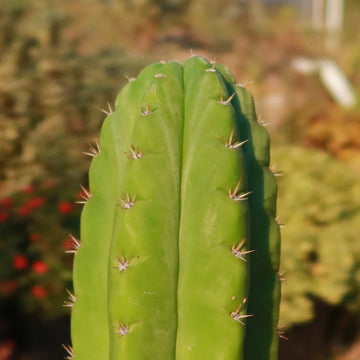
Standing tall and proud, this magnificent San Pedro cactus columnar beauty can reach heights of up to 20 feet and spread its branches wide, up to six feet! With stems that range from vibrant green to mesmerizing blue-green shades, San Pedro is a true showstopper in any landscape. As your San Pedro cactus plant matures, its colors deepen and intensify, adding even more charm to its already captivating presence.
When the San Pedro cactus flowers bloom, they emit a sweet fragrance that attracts pollinators like bees and butterflies.
The flowers are usually large and trumpet-shaped and come in various colors, including white, cream, and yellow. The petals have a delicate texture and often have a waxy appearance.
The fragrant flowers usually open during the day and close at night. They have a short blooming period, typically lasting for a day or two.
During the blooming season, which usually occurs in late spring or early summer, multiple flowers can bloom at once, creating a captivating sight.
The San Pedro cactus flowers are not only visually appealing but also have cultural significance. In some indigenous cultures, the flowers are used in traditional ceremonies and rituals. They are believed to have spiritual and healing properties.
The San Pedro cactus also has Pitahaya red San Pedro cactus fruits. These fruits are known for their sweet and refreshing flavor, making them a popular choice for consumption. Additionally, they are rich in antioxidants and vitamins, providing numerous health benefits.
When and How to Water Your San Pedro Cactus
San Pedro cactus is a drought-tolerant plant that can survive in dry conditions for long periods of time. However, regular watering is still needed to stay healthy. Generally, the San Pedro needs to be watered once every two weeks. During the summer months, when temperatures are high and the plant is actively growing, it may need to be watered more frequently.
When watering your Trichocereus Echinopsis pachanoi, be sure to soak the soil thoroughly and allow it to drain completely. To prevent root rot and other issues, avoid overwatering. The leaves may become dry and brittle, and the cactus may stop growing if it is underwater. Over time, the San Pedro cacti may start to lose their shape and become misshapen.
In addition to these physical symptoms, underwatering can also make the cactus more susceptible to pests and diseases. To keep your San Pedro cactus healthy and thriving, it is important to water it regularly and provide it with the right growing conditions.
Light Requirements - Where to Place Your San Pedro Cactus
When grown indoors, your San Pedro cactus should be placed in a bright, sunny location where it can receive at least six hours of direct sunlight each day.
For outdoor cultivation, the San Pedro cactus requires a lot of sunlight to grow and thrive.
In its natural habitat, this cactus is exposed to direct sunlight for 4-6 hours each day.
If you live in an area with a lot of cloud cover or limited sunlight, you may need to supplement your cactus's light with artificial grow lights.
So, let's give your San Pedro cactus plant what it deserves—just the right amount of light to bloom into the ultimate showstopper!
But beware; too much sun can lead to burns, so make sure you gradually increase exposure or bring it indoors during a heatwave. And if your Echinopsis pachanoi isn't getting enough light, it'll start stretching toward its source.
Optimal Soil & Fertilizer Needs
Use well-drained soil that is designed specifically for your Echinopsis pachanoi cactus. These specialty soil mixes have been precisely developed to imitate well-draining desert soils. Commercial cactus soil is affordable and available online or at Home Depot.
Planet Desert specializes in cacti and has a specialty cactus potting mix that contains 5 natural substrates and organic mycorrhizae to promote the development of a strong root system that helps your San Pedro cactus thrive.
When it comes to fertilizing your San Pedro cactus plant, it only needs a small amount of fertilizer applied once a year in the spring. Cacti prefer fertilizer with lower doses of NPK, with a maximum ratio of 5-10-5 which is higher in phosphorus than nitrogen. Remember, overfertilization can lead to root rot or even the death of the plant, so be cautious!
Hardiness Zones & More
San Pedro cactus is a hardy plant that can grow in a variety of different climates. It is native to the Andes Mountains, where it can be found growing at high altitudes in a range of temperatures. In the United States, San Pedro cactus is typically grown in warm, dry climates such as those found in the southwestern states.
When growing indoors, the San Pedro cactus prefers a warm and dry environment. It thrives in temperatures ranging from 55°F to 75°F. Aim for a humidity level of around 40% to 50% to create an ideal indoor environment for your San Pedro cactus.
For outdoor cultivation, this cactus is hardy in USDA zones 8–11, which means that it can tolerate temperatures as low as 20 degrees Fahrenheit.
If you live in an area with extreme temperatures, you may need to take extra precautions to ensure that your San Pedro cactus Echinopsis pachanoi, stays healthy.
In addition to its hardiness zone, it is also important to consider the humidity requirements of the San Pedro cactus. This cactus is adapted to dry, arid environments and does not require a lot of humidity to grow. In fact, high levels of humidity can be detrimental to the health of the plant, as they can promote the growth of mold and fungal diseases.
When growing San Pedro cactus, it is important to provide good air circulation and avoid overwatering to prevent the buildup of excess moisture around the base of the plant.
Wildlife - San Pedro Cactus Attracts the Following Friendly Pollinators
The San Pedro Cactus flowers attract several friendly pollinators such as bees, butterflies, and hummingbirds. These pollinators are essential for the reproduction of the cactus and play a crucial role in maintaining the ecosystem's biodiversity.
According to ASPCA, the San Pedro Cactus is safe for humans but can be mildly toxic to cats and dogs if ingested in a large amount. However, it is safe to touch and handle, making it a popular choice for ornamental cactus gardens. However, it is important to keep San Pedro Cactus out of reach of pets to prevent accidental ingestion.
How to Propagate Your San Pedro Cactus
Propagating the San Pedro cactus can be done through seeds or cuttings, but each method has its pros and cons. While cuttings are a quicker option, this method involves cutting off the top of the plant, which permanently alters its tall, elegant columnar form. For this reason, propagation by cuttings is only recommended if the plant has already broken or been damaged. In such cases, you can take a healthy segment, allow it to be callous for about a week, and plant it in well-draining soil to root. However, this approach is less ideal for those who wish to maintain the plant's natural aesthetics.
Seed propagation is a method for cultivating new cacti plants, and preserving their beauty. Harvested from mature cacti's fruit, seeds are cleaned, dried, and sown onto a well-draining soil mix. Despite the patience required, this method allows for healthy plants without compromising the parent cactus's appearance, despite the need for indirect sunlight or grow light.
Key Takeaways
- Unlike many other cacti, the San Pedro grows quickly, often reaching heights of 10–20 feet under ideal conditions, making it a popular choice for ornamental gardens.
- This cactus is highly adaptable, thriving in a variety of climates and requiring minimal care. It is drought-tolerant, hardy in USDA zones 8–11, and grows well in nutrient-rich, well-draining soil.
- San Pedro Cactus is a drought-tolerant that thrives in arid conditions and requires minimal watering. It is a popular choice for xeriscaping and landscaping in dry climates due to its ability to store water in its fleshy stems.
Final Thoughts
Overall, the San Pedro cactus (Echinopsis pachanoi) is a remarkable plant with unique features. It is characterized by its tall, columnar shape and beautiful white or yellow flowers. The cactus can grow to impressive heights, reaching up to 20 feet in optimal conditions. Its spines are relatively short and are arranged in clusters along the ridges of the cactus. The San Pedro cactus is a low-maintenance plant that thrives in well-draining potting soil and enjoys ample sunlight. It prefers a dry environment and can tolerate drought, so it should be watered sparingly, allowing the soil to dry out between waterings.
Don't miss out on this opportunity to add something truly exceptional to your garden. Buy San Pedro cactus for sale today to enhance your collection!
Shipping Notes
- Free Standard Shipping on $100+ Orders to the USA.
- Except Preorder products are shipped in 48 hours.
- Delivery to the USA:
- Standard Shipping : 3-10 business days
- If time is of the essence, please consider selecting expedited delivery for faster service.
Exchange/Return Notes
- We offer a 30-day return/exchange service after receiving.
- Final sale items are not eligible for returns or exchanges.
- To process your return/exchange, please contact us at [email protected]
- Please click here for more details>>> Return & Exchange Policy