Shipping Estimate
USA
- USA
- CAN
- USA
- CAN
Ships within 48 hours · Estimated delivery Jul 15 - Jul 20
 Promo Codes Available:
For Your Every Summer RSVP, with Code: SUMMER15
Description
jade plant maximum height Jade Bonsai TreeIntroducing a stunning jade bonsai tree plant, also known as Crassula ovata 'Hobbit', similar to Gollum jade. It is a cultivar of the Crassula ovata species, originally from South Africa. This lovely plant goes by several common names, such as Hobbit Jade, Shrek's Ears, and Ogre's Ears. It's important to note that while Crassula ovata Hobbit is referred to as a "tree," it is actually a succulent plant that can develop a bonsai like base, giving it a
Introducing a stunning jade bonsai tree plant, also known as Crassula ovata 'Hobbit', similar to Gollum jade. It is a cultivar of the Crassula ovata species, originally from South Africa. This lovely plant goes by several common names, such as Hobbit Jade, Shrek's Ears, and Ogre's Ears.
It's important to note that while Crassula ovata Hobbit is referred to as a "tree," it is actually a succulent plant that can develop a bonsai-like base, giving it a tree-like appearance. This adds to its unique charm and makes it a popular choice among bonsai enthusiasts.
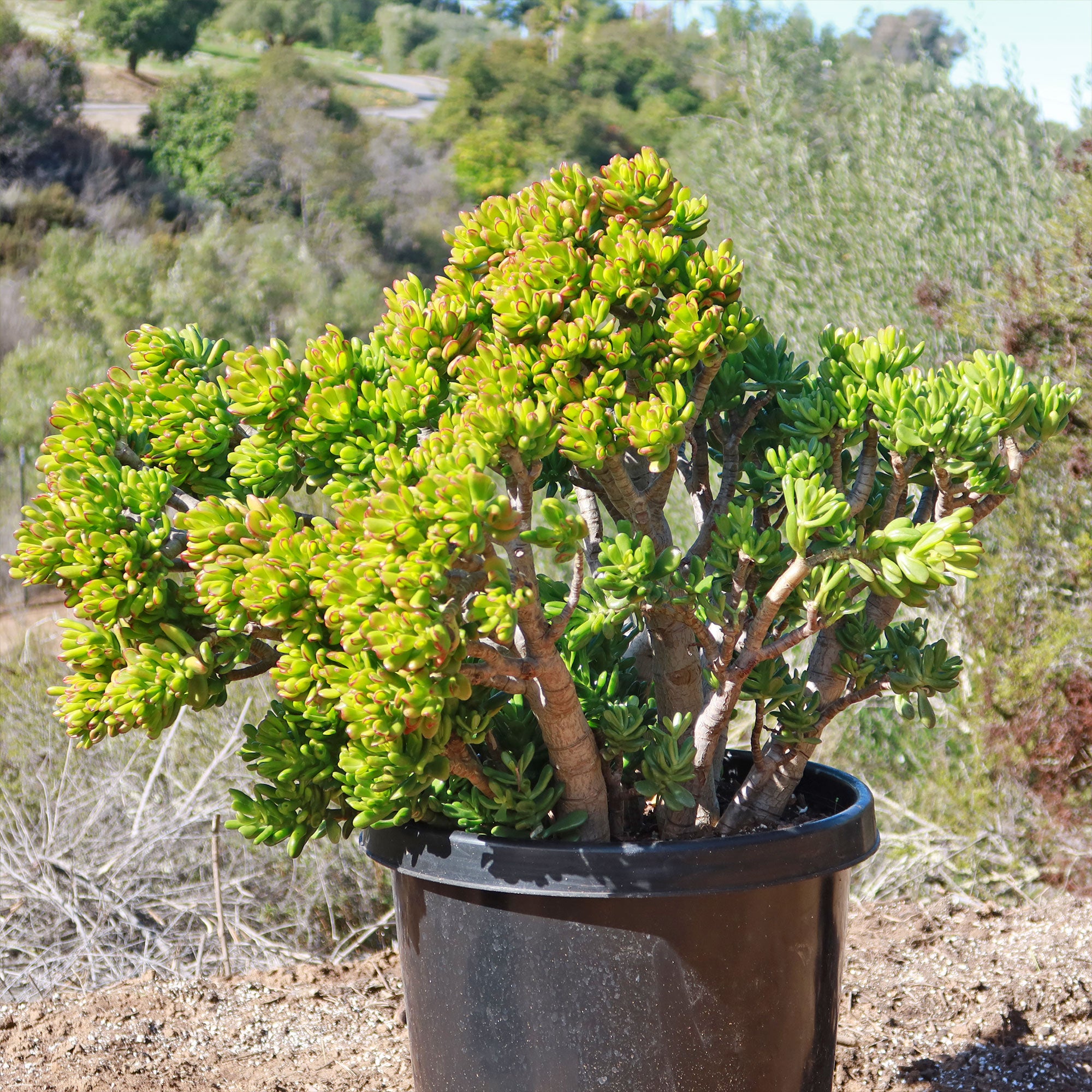
The jade bonsai tree probably needs to be 10 gal minimum to start looking like a tree; ours is a15gal, which is why it has a more mature trunk and developed appearance compared to dwarf jade bonsai trees. The larger size allows for more intricate shaping and growth potential.
When cultivated as a small bonsai tree, this jade bonsai tree typically reaches a height of around 6-8 inches, showcasing a compact shape and bushy appearance.
However, when grown as a regular potted plant, it can grow up to 3 feet tall. Imagine adding a rare and beautiful plant to your collection that develops into a woody, branching shrub that makes an excellent large bonsai tree.
If given the proper care, the jade hobbit plant can live up to 70 years. Although it grows slowly, adding only two inches to its height each year, this plant can grow to a maximum height of three to six feet.
The jade bonsai tree boasts thick, fleshy leaves that are tubular and spoon-shaped, resembling the ears of characters from movies like "The Hobbit" or "Shrek." Its leaves have a glossy, jade-green hue, and when exposed to direct sunlight, they may develop reddish edges.
The flowers of this jade bonsai tree are pinkish-white, star-shaped, and bloom from late winter to late spring, making it a true showstopper. Although it typically does not bloom indoors, this jade succulent's green and white variegated leaves are attractive.
When and How to Water Your Hobbit Jade Plants
The jade bonsai tree is drought-tolerant by nature, and its fleshy, water-storing stems can hold a lot of water. However, their root structure is easily susceptible to overwatering, so make sure that you don't overwater, as it can lead to root rot and fungal infections. The Hobbit Jade prefers watering once every 1-2 weeks in the growing season, and once a month in the dormant season.
The Crassula ovata hobbit prefers to be watered using the "soak and dry" technique. This involves thoroughly watering the jade hobbit plant before allowing it to completely dry out between watering sessions.
Both potted and outdoor variegated jade hobbit plants should receive a deep soak once or twice a month during their growth periods, ensuring proper drainage so that the roots don't become waterlogged. Avoid watering your outdoor Crassula species when it's raining or during the winter months.
Light Requirements - Where to Place Your Jade Hobbit Plant
If growing indoors, place your Crassula ovata hobbit directly in front of a west- or south-facing window.
If they don't receive enough light, their stems may grow leggy and become paler, and their spines will shorten. So, make your jade hobbit plant happy and give it plenty of light.
When grown outdoors, providing enough light for these desert jade hobbit plant (Crassula ovata Hobbit) succulents is one of the most important aspects of their care.
It is important to grow your jade plants in areas that receive at least 4-6 hours of bright, indirect light daily to keep them happy. Under bright sunlight, bright red margins appear on leaves that are up to 2 inches long.
It's critical to remember that during a heatwave, during long periods of extreme heat, your jade hobbit tree could still sustain sun damage or get sunburned. You can protect the plant in this situation by moving it indoors or to a shaded area.
Optimal Soil & Fertilizer Needs
The hobbit jade plants prefer sandy, well-drained soil, as excess moisture can promote root and stem rot. Planet Desert specializes in succulents and has a specialized succulent potting soil that includes an organic substrate with mycorrhizae to help with the growth of a healthy root system to help your Crassula ovata hobbit jade succulents thrive.
When it comes to fertilizing your jade hobbit plant, organic fertilizers with an equal mixture of 5-10-5 (NPK) once a year in the growing season (spring) will keep your soil alive. So, skip those harsh chemicals and give your hobbit jade succulent some love with some awesome organic fertilizer!
Hardiness Zones & More
In the United States, this is mostly an indoor plant, but if you live in southern Florida or Hawaii, then you can cultivate it outdoors in USDA zones 9-11.
If you live in a colder climate, it's best to keep the bonsai indoors during winter or provide protection from frost.
When placing the Jade Bonsai Tree outdoors, choose a location that receives bright, indirect sunlight or partial shade. Avoid exposing it to direct, intense sunlight, as it can scorch the leaves. Additionally, ensure the soil has excellent drainage to prevent waterlogging.
How to Grow Best Indoors Jade Bonsai Tree
When it comes to indoor bonsai cultivation, the Crassula ovata hobbit prefers average room temperatures between 60-75°F. It can tolerate slightly cooler temperatures during winter, around 50-55°F, but avoid exposing it to freezing temperatures. The Jade Bonsai Tree is adaptable and can tolerate average indoor humidity levels. However, it appreciates a slightly more humid environment, especially during the dry winter months. To increase humidity, you can place a tray filled with water near the growing bonsai or use a humidifier.
Wildlife - Hobbit Jade Plant Attracts the Following Friendly Pollinators
The Hobbit Jade Plant is known to attract butterflies, bees, and hummingbirds due to its vibrant flowers and sweet nectar. These pollinators play a crucial role in the plant's reproduction and overall ecosystem health.
Key Takeaways
- The curled, tubular leaves resemble little green fingers or trumpet-shaped tubes, which inspired its name ‘Hobbit’ after J.R.R. Tolkien’s mythical characters.
- Unlike the standard jade, the ‘Hobbit’ grows more compact and twisted, making it a naturally ideal candidate for bonsai without needing extensive shaping.
- In feng shui, it is considered a “money magnet” plant, and the unusual tubular leaves are thought to resemble fingers grasping prosperity.
- The tips of its tubular leaves can turn bright red when exposed to plenty of sunlight or cool night temperatures, adding seasonal color variation.
How to Propagate Your Crassula ovata 'Hobbit'
Crassula ovata 'Hobbit' can be propagated through stem cuttings or leaf cuttings. To propagate through stem cuttings, simply cut a healthy stem from the plant and allow it to callous before planting it in well-draining soil. Leaf cuttings can be taken by gently twisting a leaf from the plant and allowing it to dry out before planting it in soil.
Final Thoughts
Overall, the Jade Bonsai tree (Crassula ovata Hobbit) is a super cool plant with some awesome features. It's got these thick, succulent leaves that give it a unique and tree-like appearance. Crassula ovata Hobbit, often referred to as a "tree," is actually a succulent plant that can create a bonsai-like base, enhancing its unique charm and making it a popular choice among bonsai enthusiasts. Provide bright, indirect sunlight or partial shade, and use well-draining soil. Protect it from frost during colder months.
Shipping Notes
- Free Standard Shipping on $100+ Orders to the USA.
- Except Preorder products are shipped in 48 hours.
- Delivery to the USA:
- Standard Shipping : 3-10 business days
- If time is of the essence, please consider selecting expedited delivery for faster service.
Exchange/Return Notes
- We offer a 30-day return/exchange service after receiving.
- Final sale items are not eligible for returns or exchanges.
- To process your return/exchange, please contact us at [email protected]
- Please click here for more details>>> Return & Exchange Policy